“I changed the DNS, but it still goes to the old address…”
“I added the record but it won’t resolve. After a reboot, it did.”
These are the most common kinds of DNS trouble reports. In almost every case, the cause lies in how caching and TTL work.
In Part 1, we saw how a caching DNS server follows referrals from the root to the TLD to the responsible zone to find an answer. In Part 3, we look at what goes on behind that in more detail: how a caching DNS server searches for an answer and how long it remembers it, and in what order the OS of a PC or server looks up names.
- Recursive queries and iterative queries
- Root hints and priming
- Caching and TTL
- TTL over time and when a change takes effect
- Negative caching: “does not exist” is remembered too
- QNAME minimization: ask only what is needed
- Forwarding
- Conditional forwarding
- How the stub resolver behaves, part 1: Linux
- How the stub resolver behaves, part 2: systemd-resolved
- How the stub resolver behaves, part 3: Windows
- serve-stale: returning old answers during an outage
- Think about it
- Summary
- The DNS Fundamentals series (12 parts)
Recursive queries and iterative queries
There are two kinds of queries.
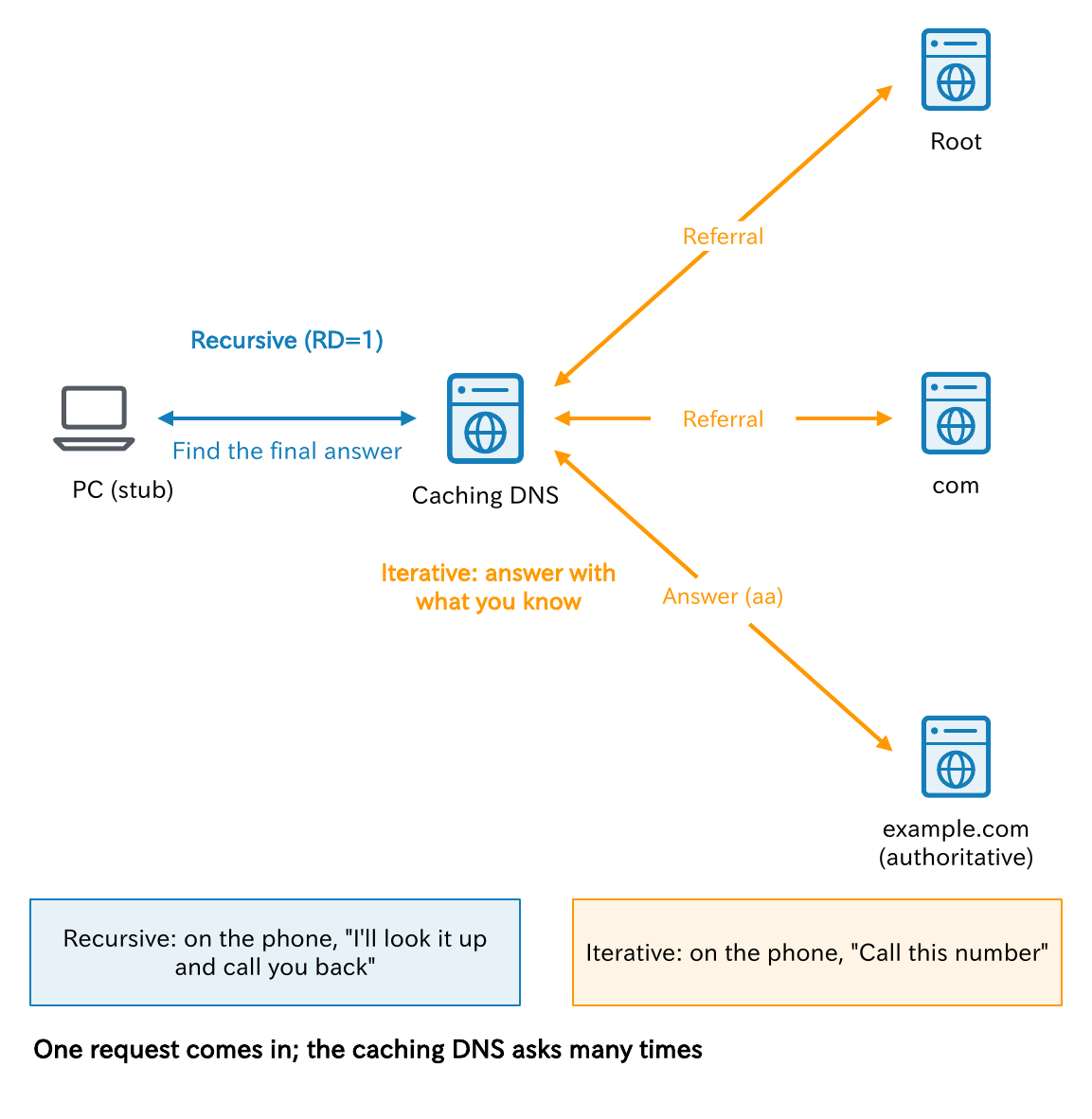
- Recursive query: the request “find out all the way to the end and just give me the answer.” A stub resolver sends it to a caching DNS server with the RD (Recursion Desired) bit set in the header.
- Iterative query: the request “answer with what you know.” A caching DNS server sends it to the root, TLD, and authoritative DNS servers.
The server receiving an iterative query returns the answer if it knows it. If not, it returns a referral to the next server to ask, and the asker moves on by itself.
In the phone analogy, recursive means “look it up and call me back,” and iterative means “we don’t know, so call this number.” A caching DNS server receives a recursive query and repeats iterative ones. It accepts the request once, but it goes out and asks many times.
An authoritative DNS server, on the other hand, does not go looking even if asked recursively, and it does not set the RA (Recursion Available) bit in its response. That is why there is no ra in the flags when you ask an authoritative DNS server with dig.
Key points
• Recursive means “find out all the way”; iterative means “answer with what you know”
• Stub → caching DNS is recursive; caching DNS → authoritative DNS is iterative
• Authoritative DNS does not recurse. The RA bit is not set in its responses
Root hints and priming
For a caching DNS server to start looking from the root, it must know the addresses of the root servers from the start. This list is the root hints. It is bundled with the software, and IANA also distributes it as a file called named.root.
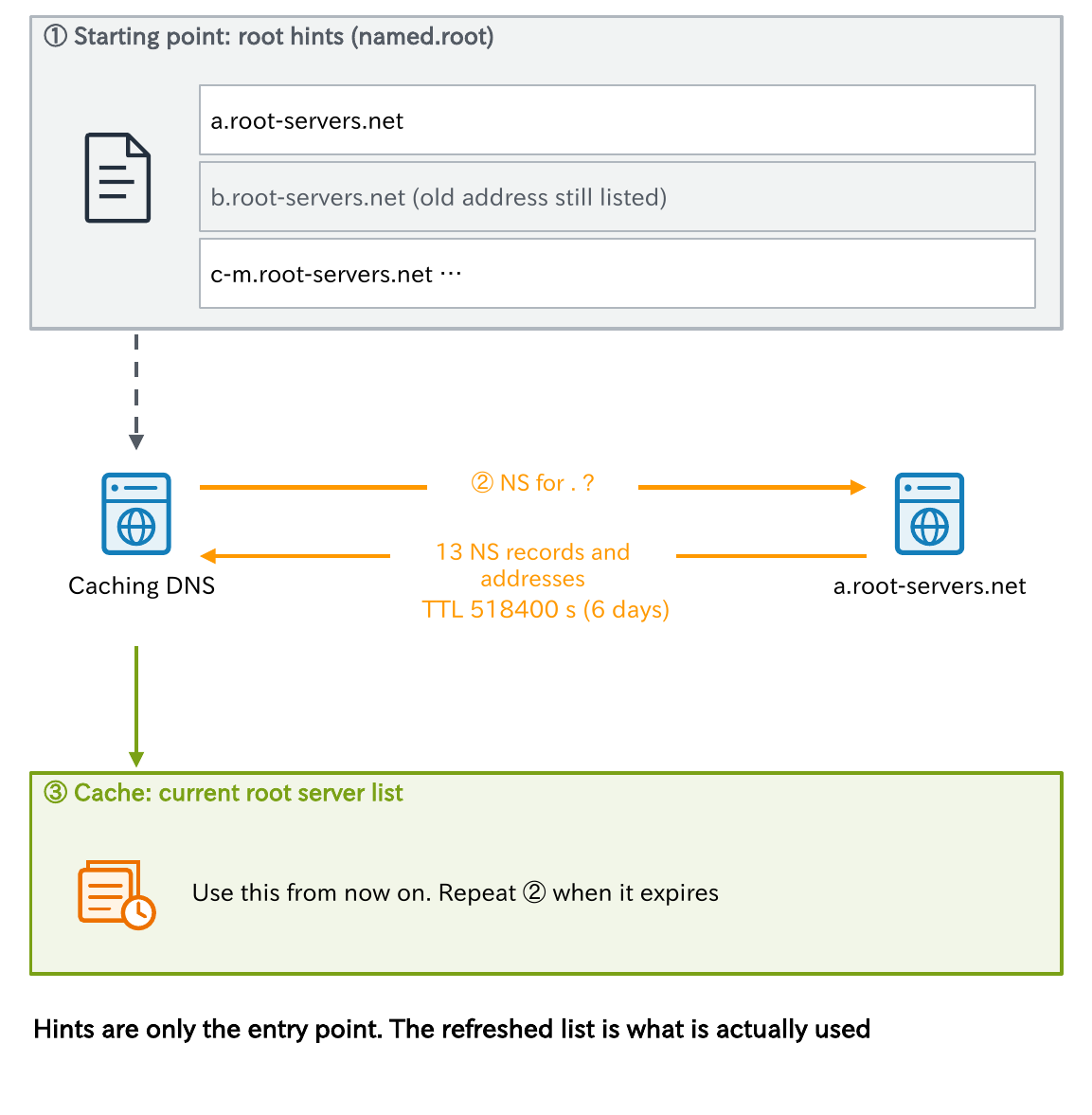
But the root hints are only a starting point. At startup, and when the cached NS records for the root expire, a caching DNS server asks one of the servers in the hints for the NS of the root (.) and refreshes its list of root servers. This is called priming, and its procedure is defined in RFC 9609 (2025, which replaced RFC 8109).
That is why name resolution still works even if part of the hints is out of date. Even so, root server addresses do change occasionally, as when the address of b.root-servers.net changed in November 2023. Keep your software and hints up to date.
Caching and TTL
A caching DNS server remembers an answer it has found only for the TTL (Time To Live), and answers repeated queries from its cache.
The TTL is a value, in seconds, that the zone administrator sets for each record, and it is the expiration time: “this answer may be used for this many seconds.” Caching makes responses faster and greatly reduces queries to upstream servers.
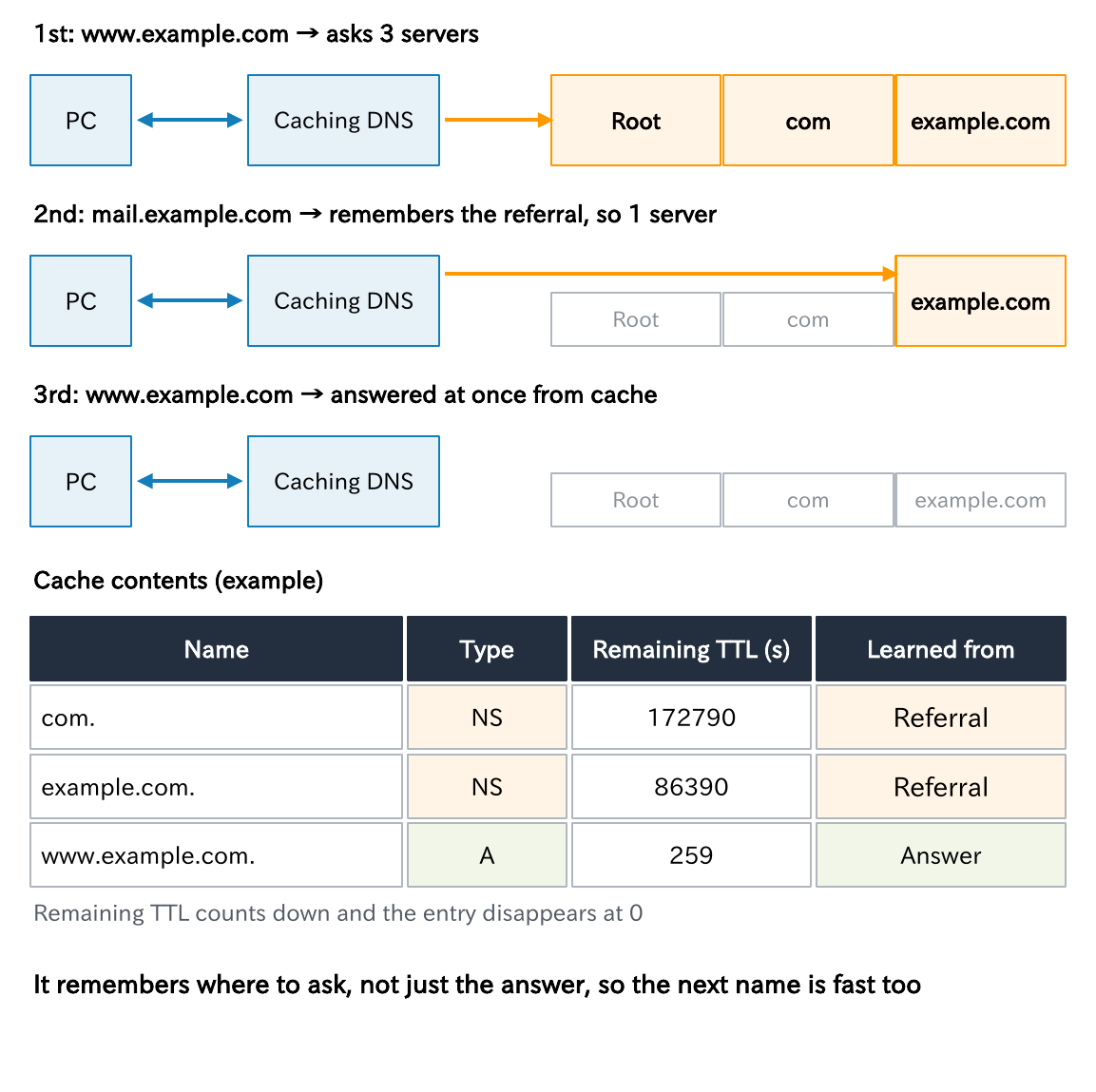
The important point is that it is not only the final answer that is cached. The referrals obtained along the way (“the com servers are here,” “the example.com servers are here”) are cached too. So the next time it looks up mail.example.com, it can go straight to the authoritative DNS server for example.com.
- The TTL that a caching DNS server returns is the remaining time, and it counts down as time passes (this is the “259” we saw in Part 1)
- An extremely long TTL is cut down to the caching DNS server’s own limit (BIND’s default is 1 week; Unbound’s is 1 day)
Key points
• The TTL is an expiration time the authoritative side sets: “how many seconds this may be used”
• Not only final answers but also the referrals (NS) obtained along the way are cached
• The TTL a caching DNS returns is the remaining time. An overly long TTL is cut to a limit
TTL over time and when a change takes effect
The TTL determines when a change takes effect.

Suppose the TTL of the A record for www.example.com is 3600 seconds (1 hour), and caching DNS server A cached it at 10:00.
- Even if you change the address on the authoritative DNS server at 10:20, A keeps returning the old address until the TTL expires at 11:00.
- For caching DNS server B, which cached it at 10:15, the old answer remains until 11:15.
It takes up to one TTL for the change to reach everyone, and during that time old and new answers are mixed.
People often say a DNS change is “propagating,” but in reality the change is not spreading anywhere. You are waiting for the caches in various places to expire. Just understanding this changes how you plan a migration.
That is why it is standard practice to shorten the TTL before a migration (see Part 7 for the procedure). Note that applications such as browsers and Java may also have their own caches.
Negative caching: “does not exist” is remembered too
This is the real cause of the “I added it but it won’t resolve; after a reboot it did” report at the start.
Negative answers are cached too: “that name does not exist (NXDOMAIN)” and “the name exists, but there is no record of that type (NODATA).” This is called negative caching, and it is defined in RFC 2308.
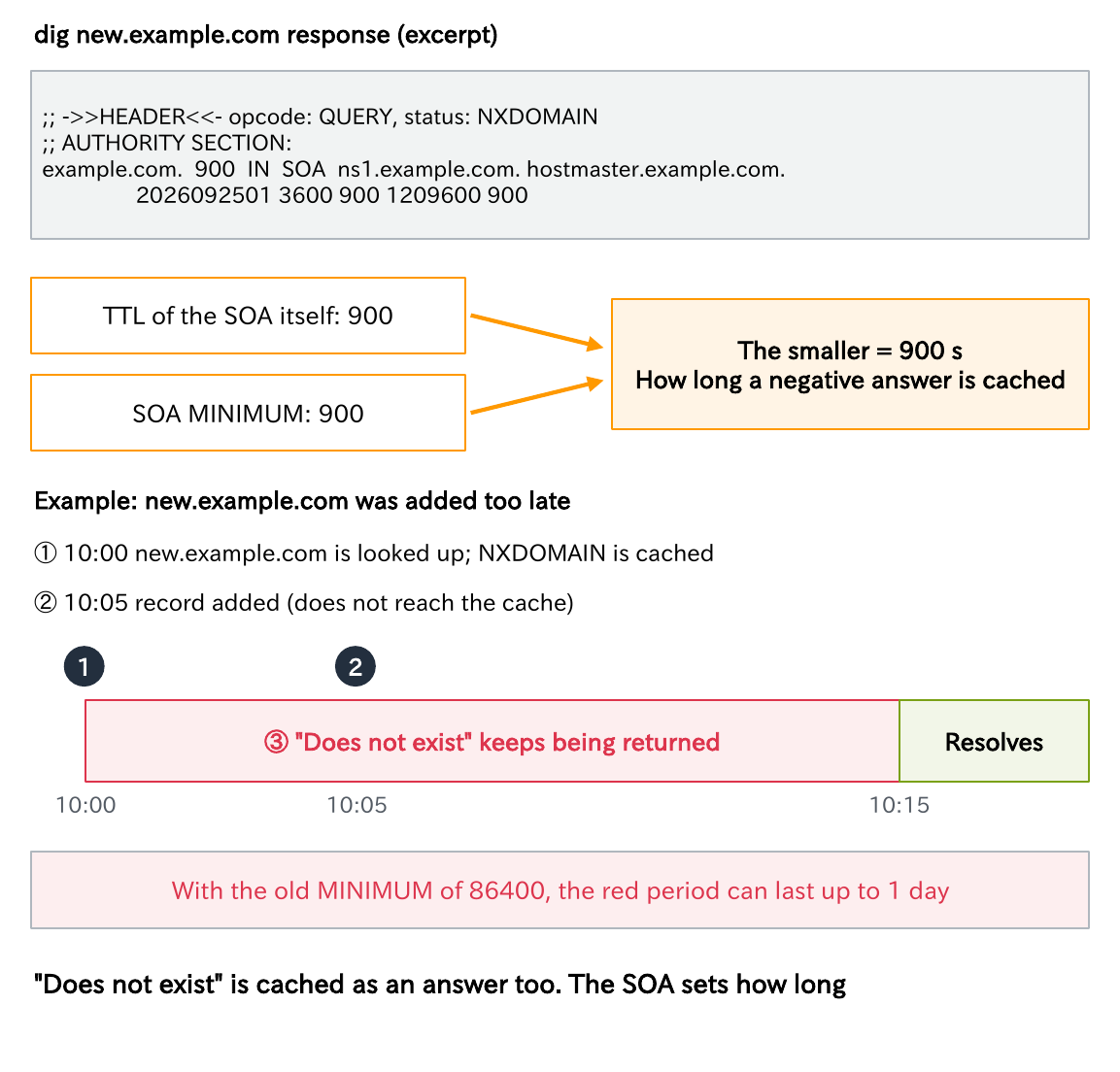
An SOA is attached to a negative answer, and the caching time is the smaller of the SOA’s MINIMUM and the SOA’s own TTL.
In the example in the diagram, someone looks up new.example.com at 10:00 and NXDOMAIN is cached. Even if you add the record at 10:05, it does not reach the cache. “Does not exist” keeps being returned until 10:15.
The meaning of MINIMUM changed
Note that the meaning of MINIMUM has changed.
- In RFC 1035, it was the record’s default TTL
- In RFC 2308, it became the time to cache negative answers
If you leave it at 86400 (one day) as in an old procedure, the “does not exist” that someone looked up before the record was added lingers for a long time, producing the “I added it but it won’t resolve; after a reboot it did” situation. RFC 2308 considers 1 to 3 hours reasonable and says more than a day is a problem. Caching DNS servers have their own limits too (by default, BIND caps it at 3 hours and Unbound at 1 hour).
Key points
• Negative answers (“does not exist”) are cached too
• The retention time is the smaller of the SOA’s MINIMUM and the SOA’s own TTL
• The meaning of MINIMUM changed. Do not leave the old 86400
QNAME minimization: ask only what is needed
A traditional caching DNS server sent the full name as is, www.sales.example.com, to the root and to the TLD servers as well.
But all the root needs to know is who is responsible for com, and for the com servers it is enough to know who is responsible for example.com. Sending the full name tells more servers than necessary which site the user is trying to visit.
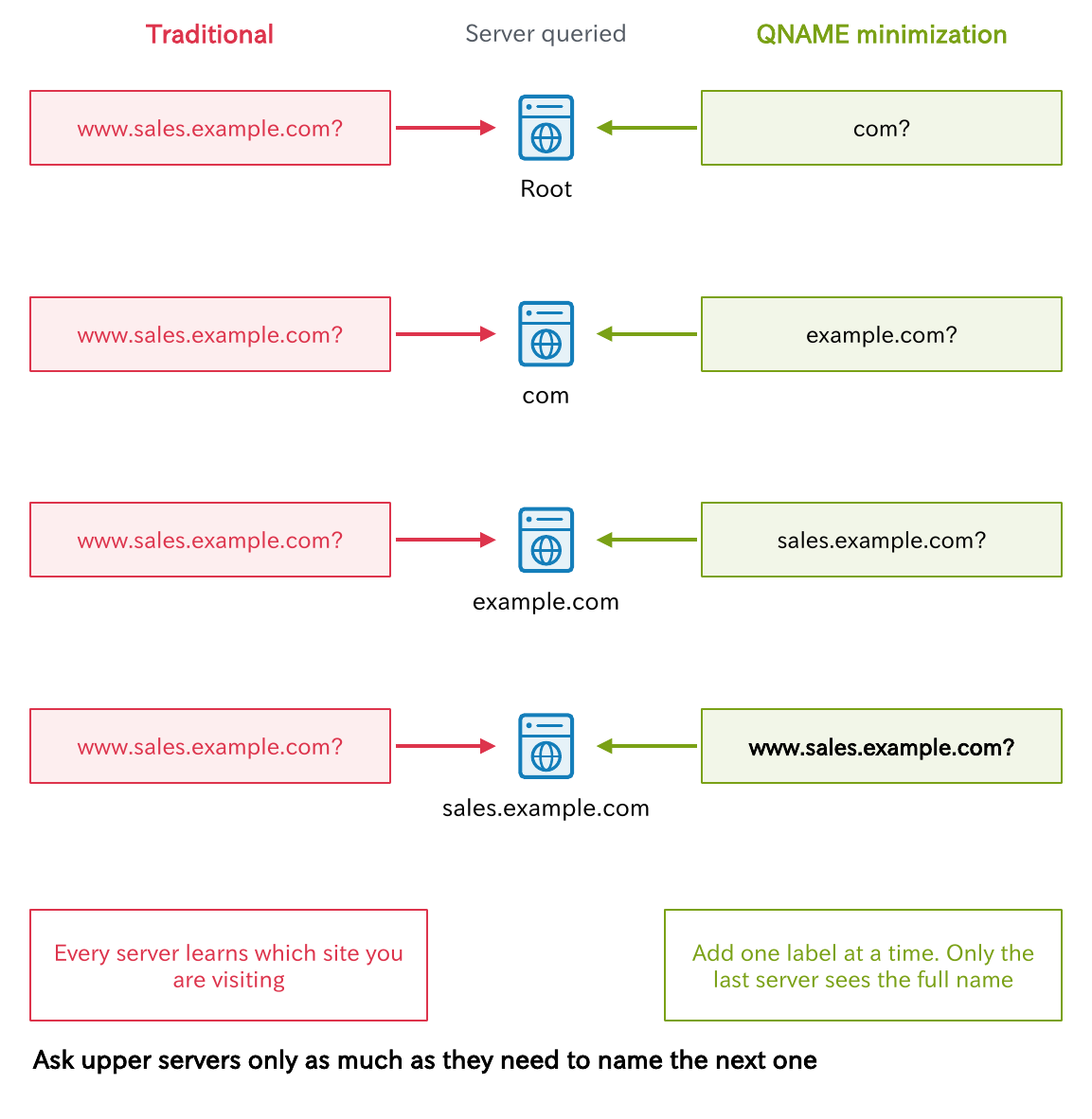
QNAME minimization (RFC 9156, 2021) is a method that asks for only the labels needed at each step. It asks the root only for com, asks the com servers only for example.com, and asks the responsible authoritative DNS server for the full name at the very end.
Today it is enabled by default in major products such as BIND (relaxed mode) and Unbound. However, it can fail if an authoritative DNS server does not answer correctly for intermediate names, which makes it something to check when “only a particular domain won’t resolve.”
Forwarding
A forwarder is a server that does not look up a received query itself, but forwards it as a recursive query to another DNS server you specify.
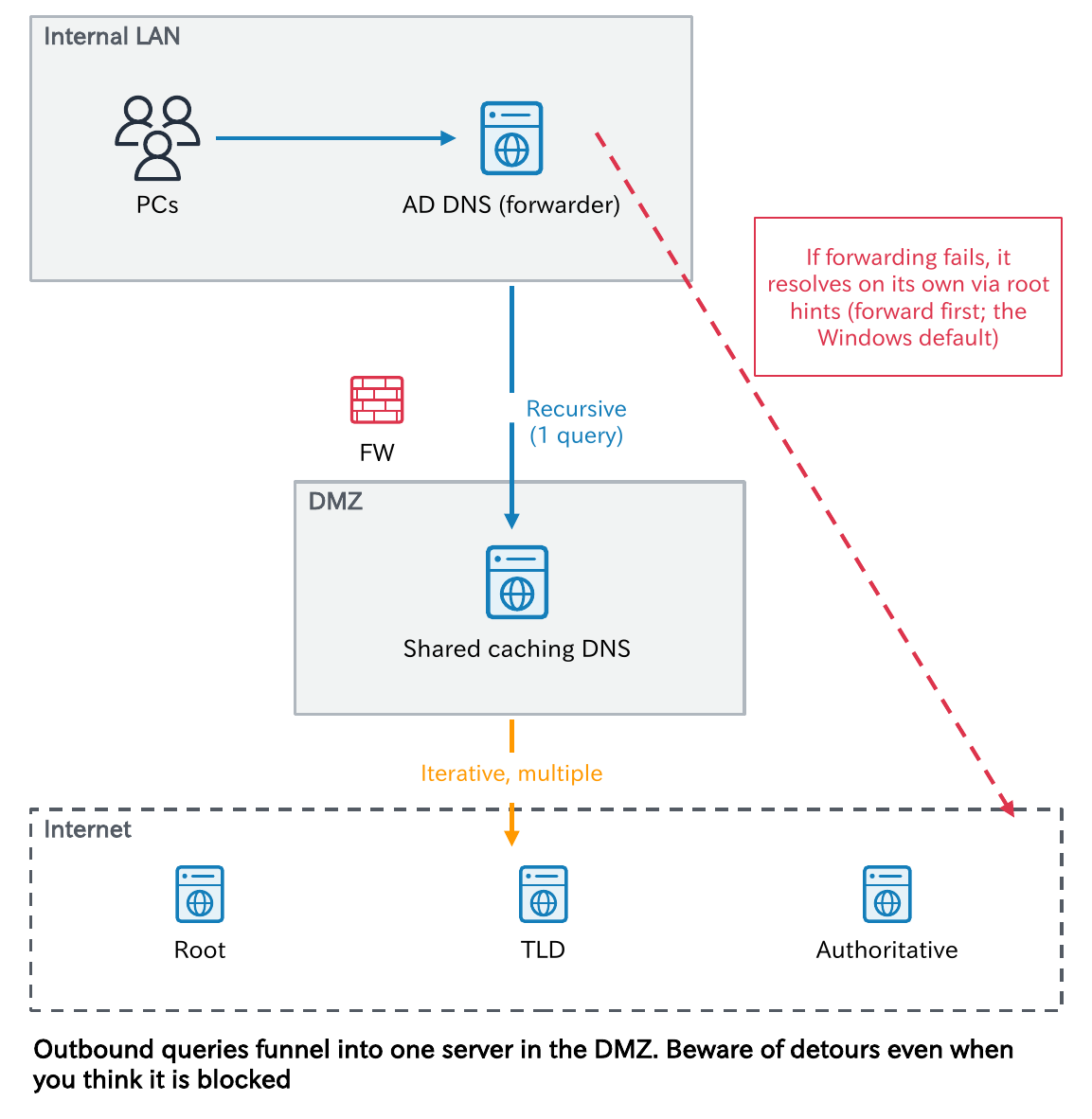
In companies, a common setup makes the AD or branch-office DNS servers forwarders and forwards external names to a shared caching DNS server, for example in the DMZ. You can limit which servers query the outside, and the cache works well. The difference from a caching DNS server is whether it walks the hierarchy itself.
The “I stopped it but it still resolves” trap
The thing to watch is what happens when the forwarding target does not respond. With BIND’s default (forward first) and the default of Windows Server DNS, if forwarding fails, the server walks the hierarchy from the root itself. So “I stopped the forwarding target but names still resolve” can happen.
Even if you think you have closed outbound port 53 on the firewall, this fallback may be using an unexpected path, so be careful. To limit the server to forwarding only, configure it as follows.
- BIND:
forward only - Windows Server: turn off the setting that uses root hints (UseRootHint)
Key points
• A forwarder sends one recursive query to an upstream caching DNS
• You can concentrate outbound queries on a few servers, and the cache works well
• Some products resolve on their own when forwarding fails (the BIND and Windows defaults)
Conditional forwarding
Conditional forwarding is a feature that forwards only specific domains to a specified DNS server. Everything else is handled as usual (resolved by the server itself, or sent to the regular forwarder).
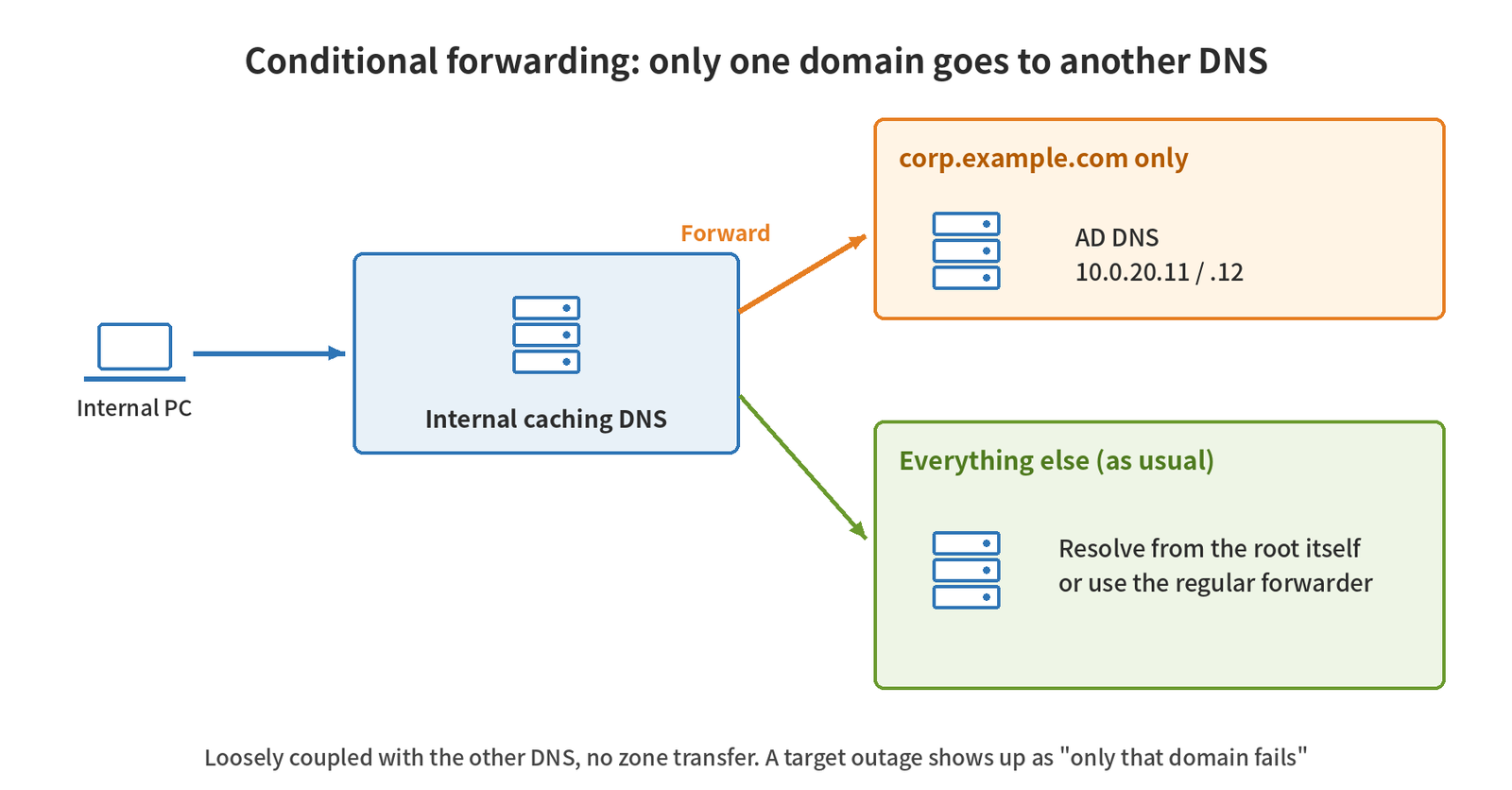
Typical uses are the following.
- The internal AD domain
- The domain of a company you have merged with
- The domain of a site behind a VPN
- Private zones in the cloud (Part 10)
The advantage is that you can cooperate with the other party’s DNS while staying loosely coupled, without a zone transfer (Part 7). A failure of the forwarding target shows up as only that domain failing to resolve.
# BIND (named.conf)
zone "corp.example.com" {
    type forward;
    forward only;
    forwarders { 10.0.20.11; 10.0.20.12; };
};
# Windows Server (PowerShell)
Add-DnsServerConditionalForwarderZone -Name "corp.example.com" `
-MasterServers 10.0.20.11,10.0.20.12 -ReplicationScope "Forest"There are two cautions.
- Two servers forwarding to each other creates a loop
- On a caching DNS server with DNSSEC validation enabled, internal subdomains that do not exist on the public side can fail validation (Part 9)
How the stub resolver behaves, part 1: Linux
From here on, we look at the behavior of the side that sends the queries (the stub resolver). First, Linux.
$ cat /etc/resolv.conf
nameserver 192.0.2.53
nameserver 192.0.2.54
search corp.example.com example.com
options timeout:2 attempts:2

$ grep ^hosts /etc/nsswitch.conf
hosts: files dns- nameserver: the caching DNS servers to ask. Up to 3, used from the top down (
options rotatespreads the load). The default timeout is 5 seconds, with 2 attempts - search: for a name with fewer dots than ndots (default 1), these domains are tried first.
pc01→pc01.corp.example.com→pc01.example.com, in that order - The hosts: line of nsswitch.conf: the order of lookup.
files(/etc/hosts) →dns. Some environments also includemdns4_minimalorresolve(systemd-resolved)
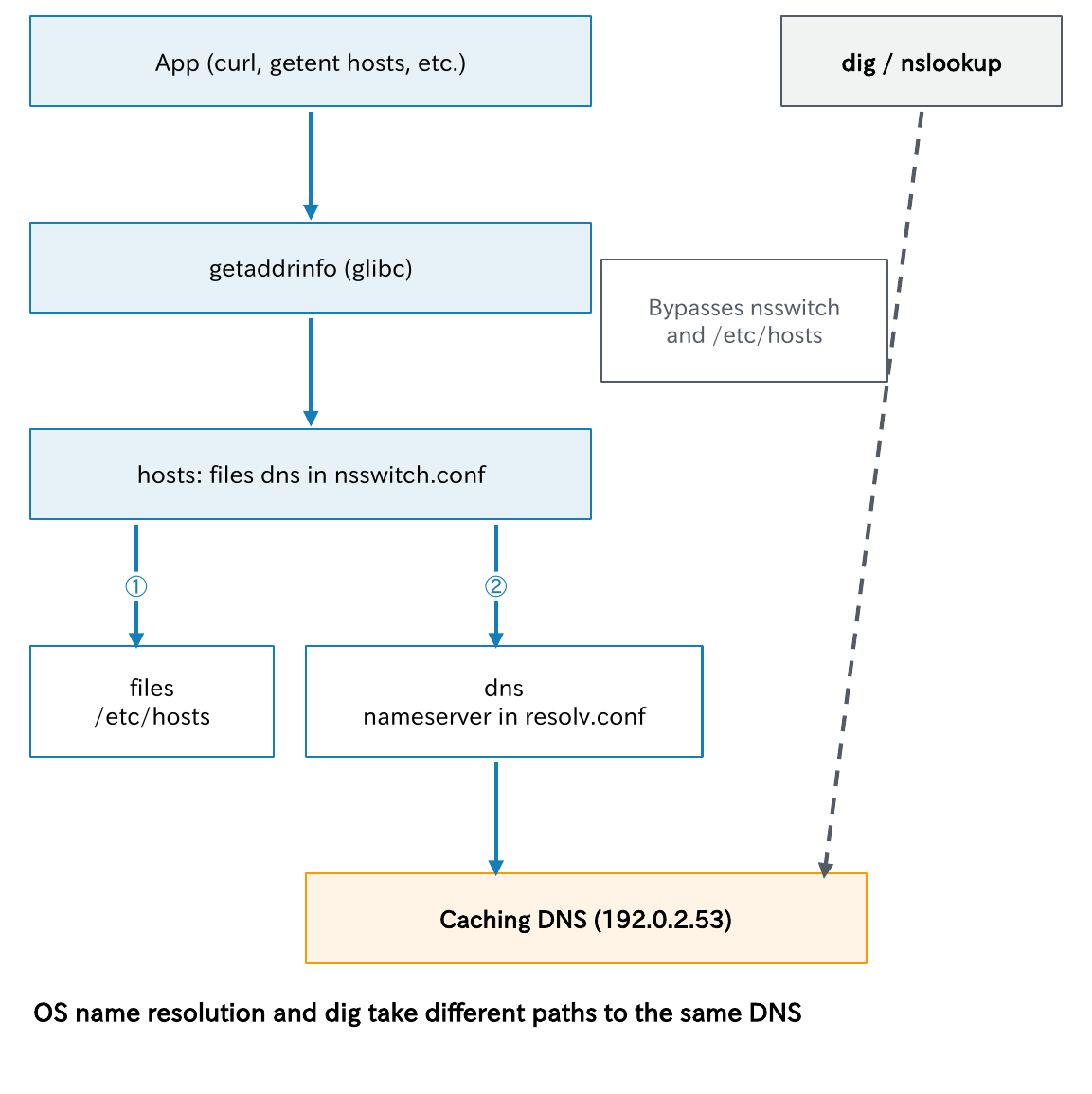
What matters here is that dig and nslookup do not go through this mechanism and ask DNS directly. This means “it resolves with dig but not from the application” can happen (for example, when hosts has an old line). To check through the same path as the OS, use getent hosts name.
How the stub resolver behaves, part 2: systemd-resolved
On Ubuntu, Fedora, and similar systems, systemd-resolved plays the role of the stub resolver. In this case, the only upstream in /etc/resolv.conf is nameserver 127.0.0.53.
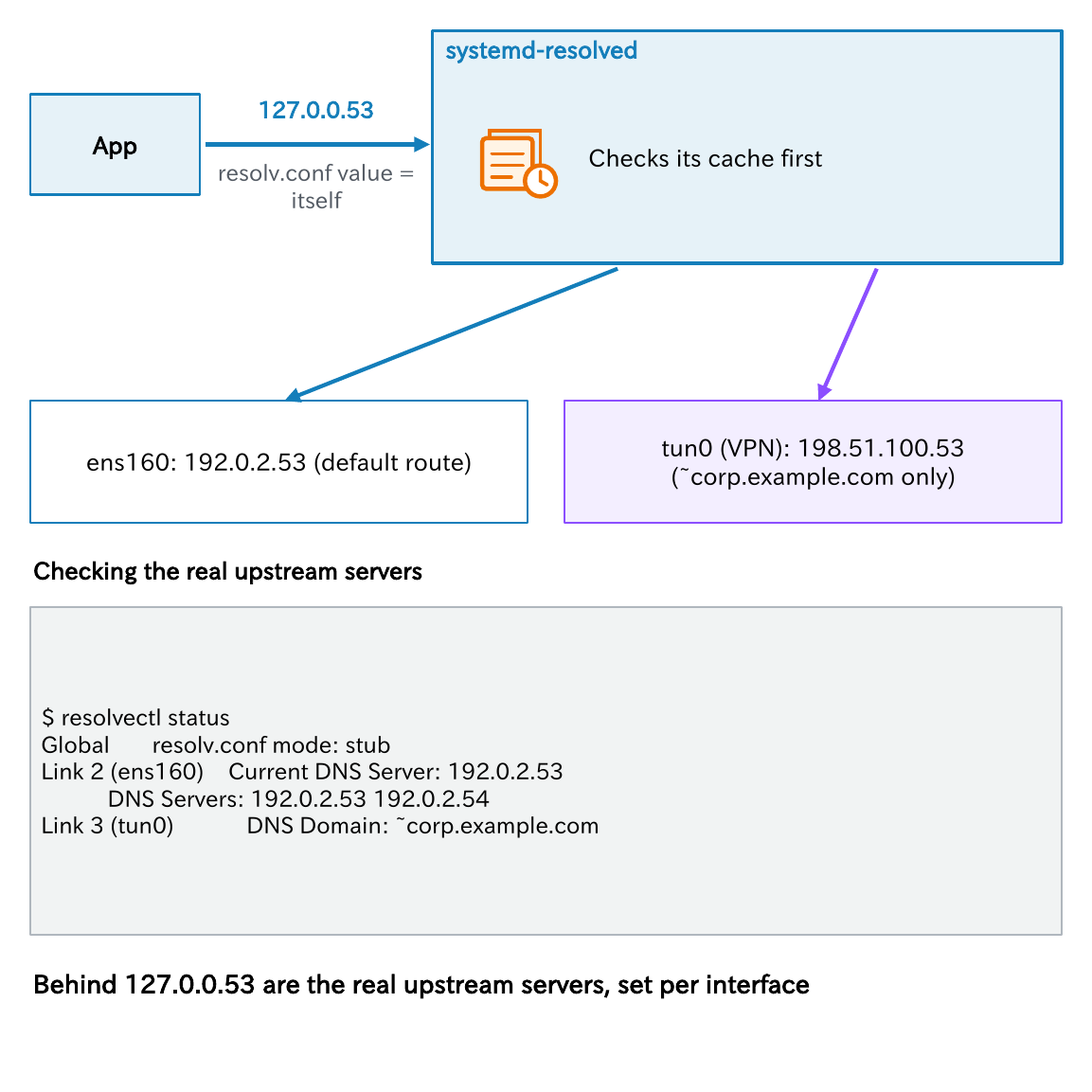
Applications ask systemd-resolved, which listens on 127.0.0.53 on the machine itself; systemd-resolved checks its cache and then queries the real DNS servers.
- Check the real upstream servers with
resolvectl status - DNS servers and the domains they handle can be set per interface. For example, while a VPN is connected, only internal domains (
~corp.example.com) can be sent to the VPN side - Clear the cache with
resolvectl flush-caches 127.0.0.54is a separate listener that performs no validation, LLMNR, or mDNS, and relays queries upstream almost as is
If you are puzzled to find only 127.0.0.53 in resolv.conf, look at resolvectl status.
How the stub resolver behaves, part 3: Windows
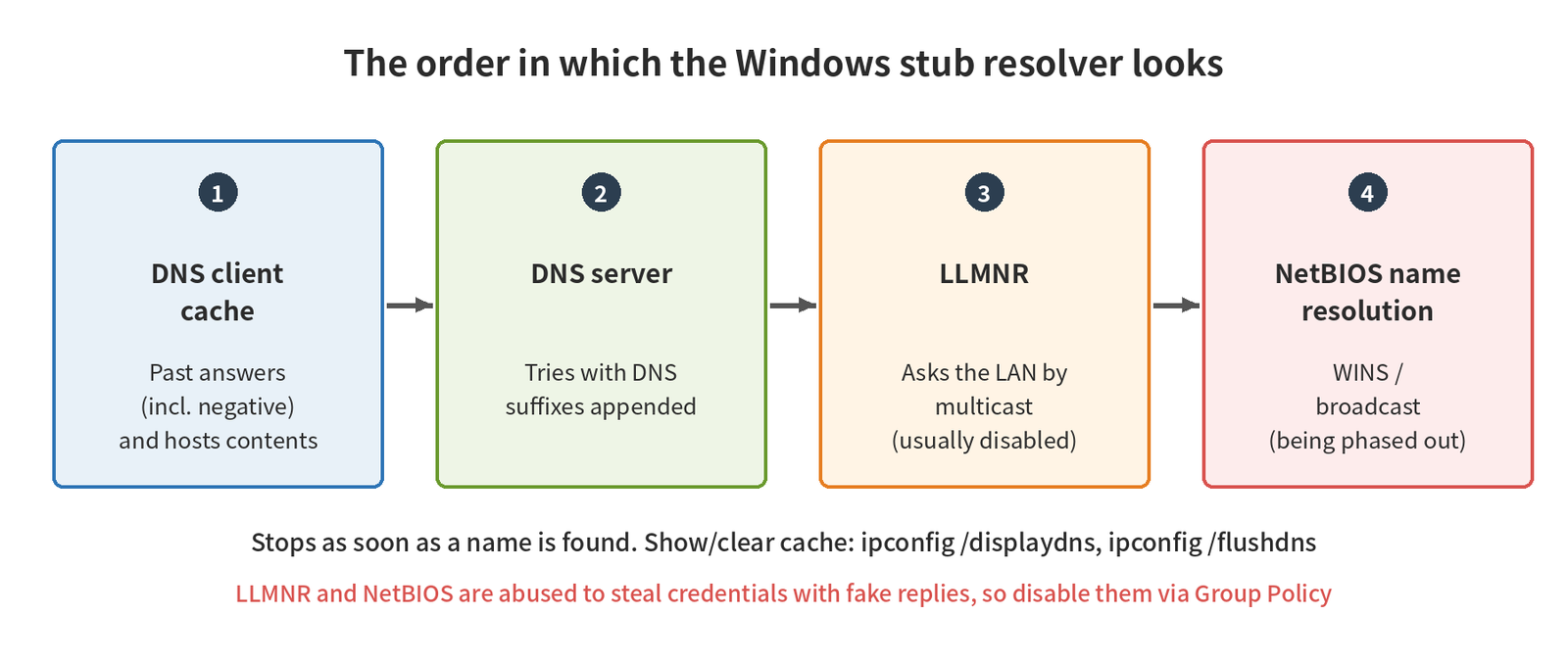
The Windows stub resolver looks up names in the following order.
| Order | Where it looks | Details |
|---|---|---|
| 1 | DNS client cache | Past responses (including negative ones) and the contents of the hosts file |
| 2 | DNS server | The DNS servers in the network settings. It tries appending DNS suffixes (primary, connection-specific, and the search list) |
| 3 | LLMNR | Asks the LAN by multicast for names DNS cannot resolve |
| 4 | NetBIOS name resolution | Asks WINS or uses broadcast |
- The DNS Client service (Dnscache) manages the cache. Display it with
ipconfig /displaydnsand clear it withipconfig /flushdns(in PowerShell,Get-DnsClientCacheandClear-DnsClientCache) - LLMNR and NetBIOS are abused in attacks that steal credentials with fake responses. Disabling them with Group Policy is the common practice
- In 2022, Microsoft announced a plan to phase out LLMNR and NetBIOS name resolution in favor of mDNS. In Windows Server 2025, locating domain controllers through NetBIOS is disabled by default
The cache also holds negative responses, so if “a name that failed to resolve a moment ago still won’t resolve even after I fixed DNS,” try ipconfig /flushdns on the client side too.
serve-stale: returning old answers during an outage
Finally, a somewhat newer mechanism.
If an authoritative DNS server goes down or becomes unreachable, names in that domain stop resolving once the cached TTL expires. serve-stale (RFC 8767, 2020) is a mechanism that, only in such cases, allows the server to temporarily return an expired cache entry (a stale answer).

- The TTL of the returned answer is 30 seconds, and a retention period of about 1 to 3 days for stale answers is recommended
- For example, even if the authoritative DNS server is down for an hour, users can stay connected using the address that worked until just before
- On the other hand, there is a side effect: if the authoritative DNS server goes down right after you change an address, the stale answer keeps being returned
- Enable it with
stale-cache-enableandstale-answer-enablein BIND, andserve-expiredin Unbound. Both are disabled by default
Keep it in mind as a reason why “during an outage, it still resolves on some DNS servers.” Even for the same outage, the serve-stale setting changes how it looks to users.
Think about it
- Next week you must change a web server’s address at night. The current TTL is 86400 seconds. When, and what, should you do beforehand?
- You are told that a newly added record “only resolves for some people.” List possible causes, separated into the caching DNS side and the client side.
- Is your company’s internal DNS server a forwarder, or a caching DNS server that walks from the root itself? What does it do when the forwarding target goes down?
Hint: This article’s “TTL over time and when a change takes effect,” “Negative caching,” “What happens when forwarding fails,” and “How the stub resolver behaves (the client-side cache)” are good clues.
Summary
- Stub → caching DNS is recursive; caching DNS → authoritative DNS is iterative
- Not only answers but also referrals along the way are cached. The TTL counts down as remaining time
- The real nature of “propagation” is waiting for caches to expire. Shorten the TTL before a migration
- “Does not exist” is cached too. Do not leave the SOA MINIMUM at 86400
- A forwarder may resolve on its own when forwarding fails
- dig does not go through the OS name resolution path. To check through the same path as the OS, use
getent hosts
Next time, we cover what is inside DNS messages and how they are carried over UDP, TCP, and more.
The DNS Fundamentals series (12 parts)
All 12 parts with a reading guide: DNS Fundamentals
- What Is DNS? How Name Resolution Works and Its Three Key Players
- The domain name hierarchy and delegation
- How name resolution works (this article)
- DNS messages and transport
- Resource records, part 1
- Resource records, part 2
- Running authoritative DNS servers
- Investigating with commands
- DNS security
- DNS in the cloud and on corporate networks
- DNS troubleshooting
- DNS design exercises
This series is the English edition of 【DNS入門】, originally written in Japanese.

コメント