“I memorized that AWS has six advantages, but when a question words them differently, I can’t tell which one it means.”
“I thought the cost benefit was simply ‘it’s cheaper,’ but every option looks like it would save money, so I get stuck.”
AWS Certified Cloud Practitioner (exam code CLF-C02, CLF below) often asks you to identify one of the cloud advantages that AWS lists from the situation described in the question. The terms themselves rarely appear. Instead, the question uses paraphrases such as “upfront costs” or “procures in large volumes.”
This article is Question 1 of a series that explains CLF practice questions one at a time. The author wrote the questions to match the scope of the exam; they are not actual exam questions. Choose your answer first, then read the explanation.
Question
A startup company plans to launch a new web service. Because its funds are limited, it does not want to spend a large upfront sum on buying servers. Which of the following are cost benefits the company gains by adopting the AWS Cloud? (Choose two.)
- A. Each customer is always assigned a dedicated physical server, which lowers costs
- B. The company can set a longer depreciation period for the hardware it purchases
- C. The company pays the same fee every month regardless of usage, so it can fix its budget
- D. Because AWS procures and operates at massive scale, customers benefit from lower unit prices
- E. Instead of an upfront investment in buying servers, the company pays only for what it uses
Once you have chosen two answers, open the section below.
Show the answer (click to open)
Answer: D and E
D is “economies of scale,” and E is “trading fixed expense (capital expense) for variable expense.” Both are cost-related benefits among the six advantages of cloud computing that AWS lists.
The answer is D and E
The correct answers are D and E.
- D: unit prices fall because AWS procures in large volumes, which is economies of scale
- E: you pay only for what you use instead of making an upfront investment, which is trading fixed expense for variable expense
Both are cost-related benefits among the six advantages of cloud computing that AWS lists. Let’s look at the options one at a time.
Explanation of each option
A: A dedicated physical server costs extra (incorrect)
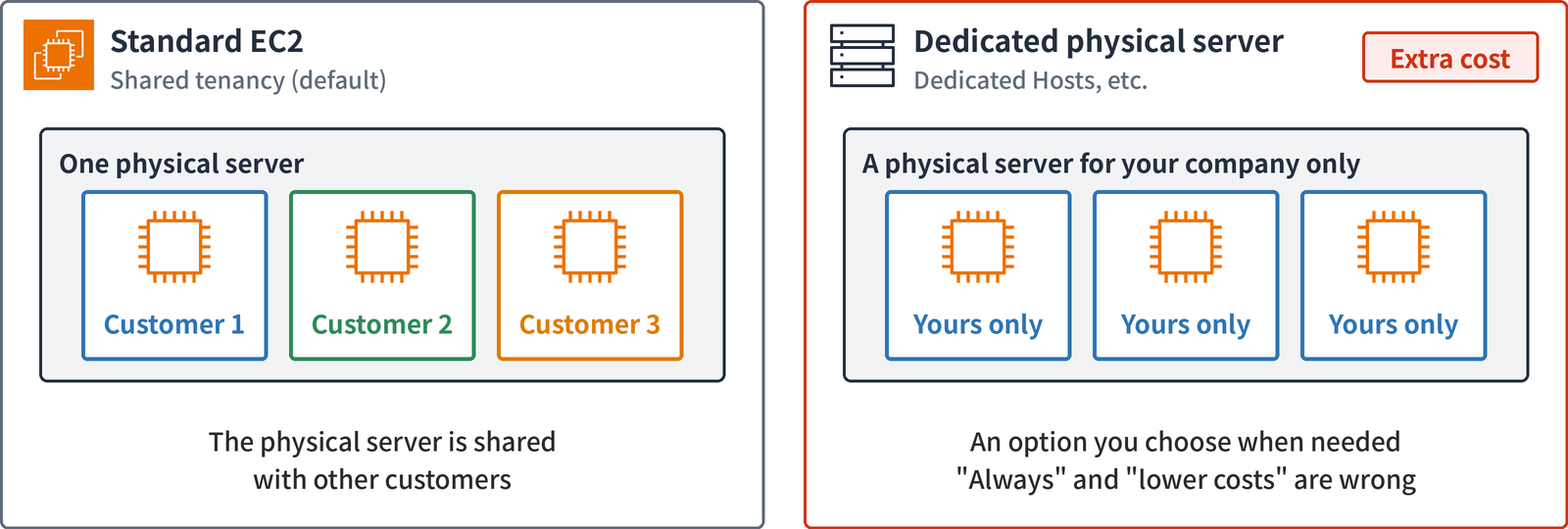
As shown on the left of the diagram, standard Amazon EC2 works by sharing one physical server with other customers.
As shown on the right, you can also use a physical server dedicated to your company (Dedicated Hosts, for example). However, this is an option you choose when you need it, for example because of licensing terms, and it comes at extra cost. Both “always assigned” and “lowers costs” are wrong.
B: Depreciation is an on-premises concept (incorrect)
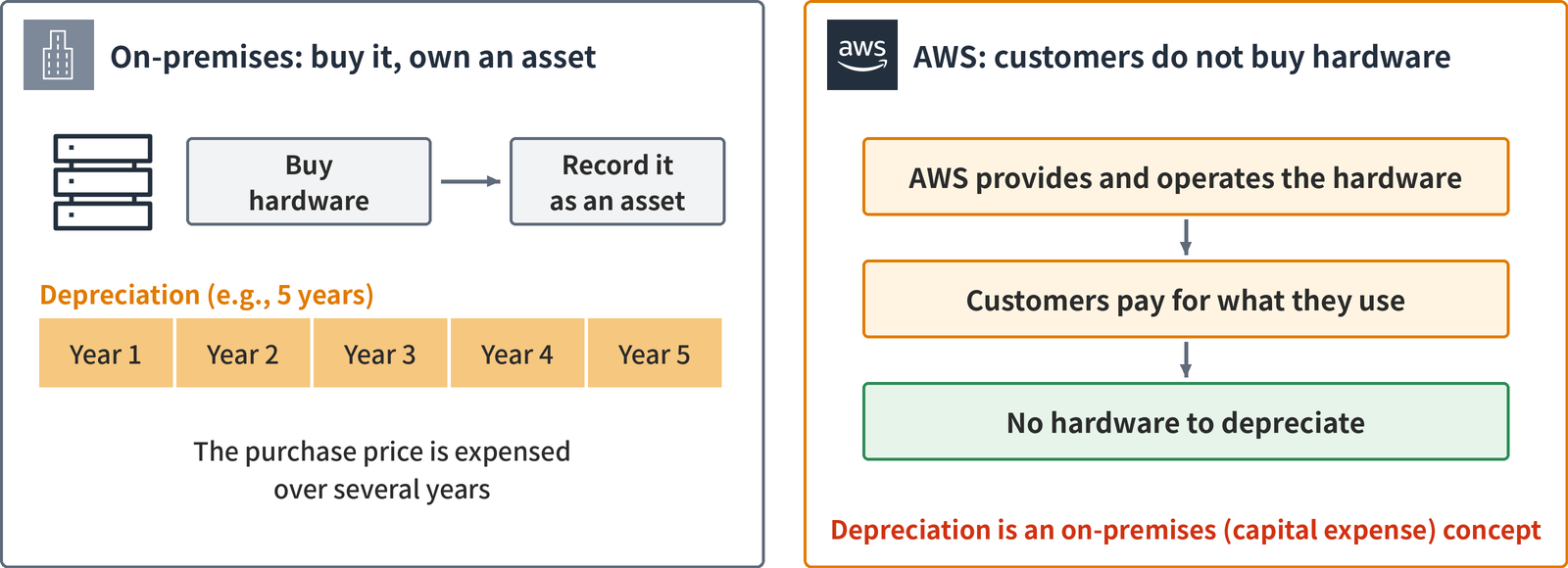
You buy hardware, record it as an asset, and turn it into an expense over several years. This is depreciation, and it is a concept from on-premises environments (where the company owns its servers). In accounting terms, it is a capital expense.
In the cloud, AWS provides and operates the hardware. Customers do not buy it; they pay for what they use. So the idea of the customer deciding the depreciation period does not apply.
C: Not a flat rate but pay-as-you-go (incorrect)
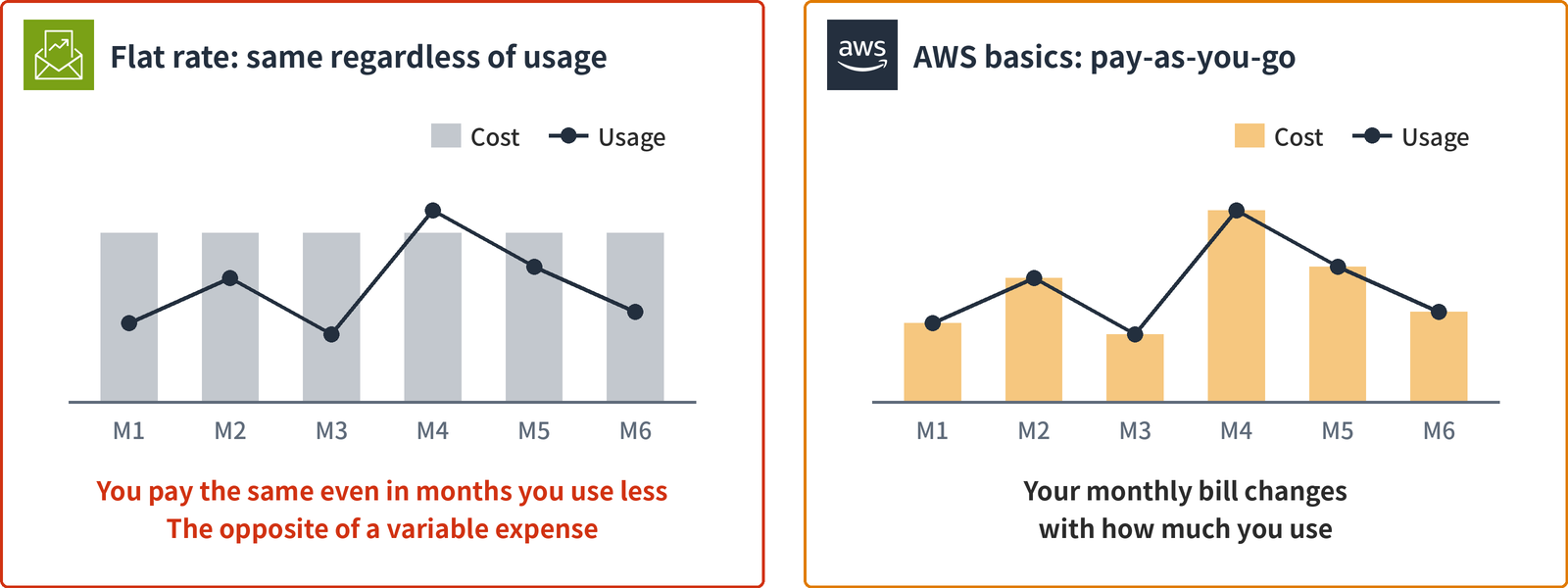
The basic AWS model is pay-as-you-go: the price changes with the amount you use. As shown on the right of the diagram, the cost rises in months when usage rises and falls in months when usage falls.
With the option’s “the same fee every month regardless of usage” (the left of the diagram), you pay the same amount even in months you hardly use anything. It is the opposite of turning costs into a variable expense.
D: Lower unit prices through economies of scale (correct)
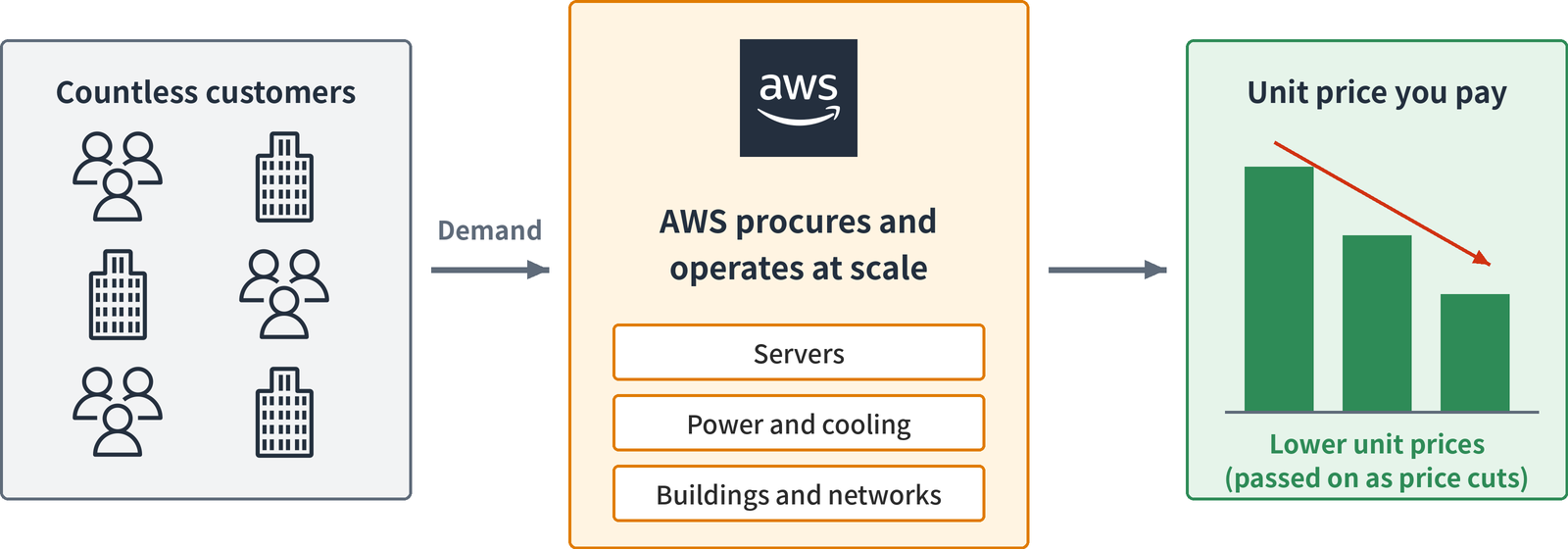
This is economies of scale. AWS aggregates demand from a huge number of customers and procures and operates servers, power, and buildings at massive scale. Unit prices are lower than when a single company buys on its own, and the benefit is passed on to customers as price cuts.
The words “economies of scale” appear in neither the question nor the option. You identify it from what it describes: “procures and operates at massive scale” and “lower unit prices.”
E: Pay only for what you use instead of an upfront investment (correct)
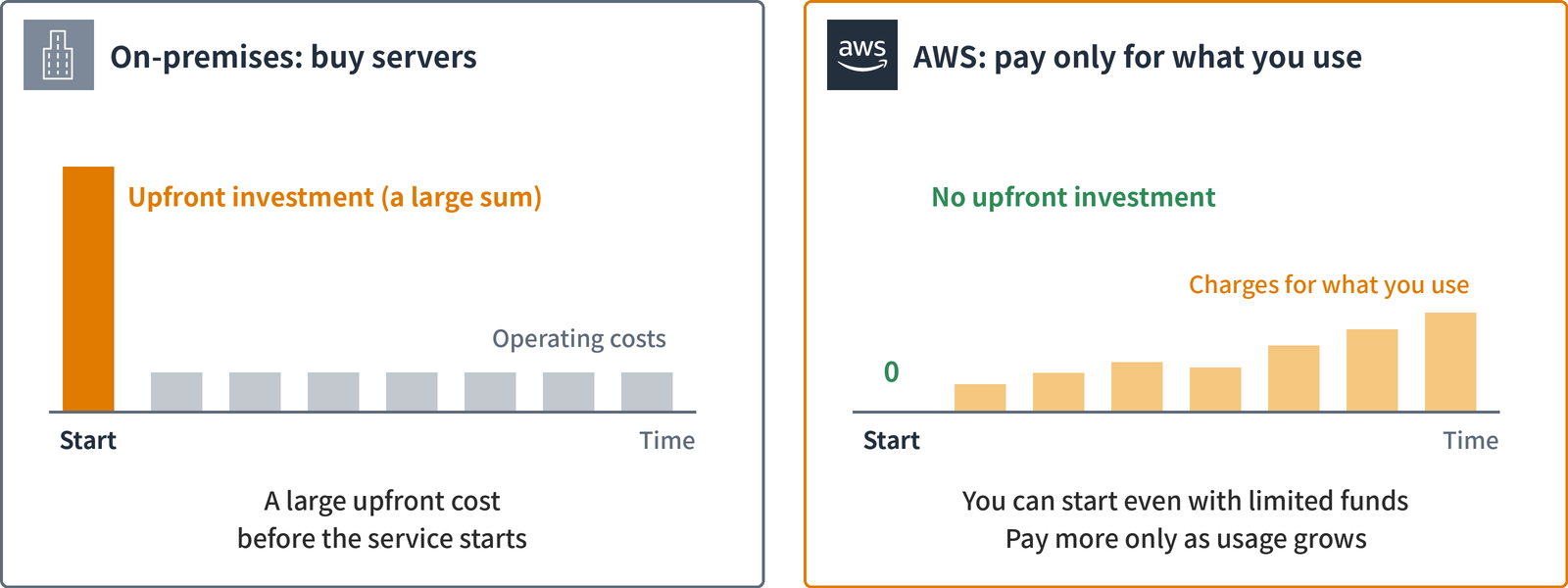
On-premises, as shown on the left of the diagram, you buy servers before the service starts, so you need a large upfront investment. That is a capital expense.
With AWS, you start without an upfront investment and pay only for what you use. This is the benefit of trading fixed expense (capital expense) for variable expense. That is why it suits a startup with limited funds.
The two cost advantages and how questions phrase them
Here are the two cost-related advantages among the six, together with how questions phrase them.
| Among the six advantages | Example phrasing in questions |
|---|---|
| Trade fixed expense (capital expense) for variable expense | Pay only for what you use instead of an upfront investment / no upfront investment needed / pay-as-you-go |
| Benefit from massive economies of scale | AWS procures and operates at massive scale, and customers benefit from lower unit prices / passed on as price cuts |
| The wrong options in this question | Pay the same fee every month to fix the budget / depreciation of hardware / a dedicated physical server lowers costs |
The wrong options in the third row are all either the opposite of the cloud’s cost benefits or about something else.
Key points
- “Does not want to spend a large upfront sum” → trade fixed expense for variable expense (pay-as-you-go)
- “Procures and operates at massive scale for lower unit prices” → economies of scale
- Depreciation is an on-premises concept. A dedicated physical server is an option that comes at extra cost
The course articles explain the six advantages as a whole, fixed and variable costs, and total cost of ownership (TCO) in detail.
- Lecture 2, Part 2: Benefits of the AWS Cloud
- Lecture 2, Part 3: Cloud economics
You can read all 14 lectures of AWS Cloud Practitioner Exam Prep in order from its series page.
The CLF-C02 Practice Questions series (100 questions)
All 100 questions with a reading guide: CLF-C02 Practice Questions
- Question 1: Cost benefits of starting without upfront costs (pay-as-you-go and economies of scale) (this article)
- Question 2: Going global in minutes (a simultaneous worldwide launch and low latency)
- Question 3: High availability (EC2 across multiple AZs and RDS Multi-AZ)
- Question 4: Cloud agility (create in minutes, delete right away)
- Question 5: Shared responsibility model (what AWS takes over when you rehost on EC2)
- Question 6: Preparing for a traffic peak that lasts a few hours (Amazon EC2 Auto Scaling and On-Demand Instances)
- Question 7: The six pillars of Well-Architected (reliability and performance efficiency)
- Question 8: Design principles of the reliability pillar (automatic recovery and horizontal scaling)
- Question 9: Design principles of the sustainability pillar (maximizing utilization and managed services)
- Question 10: Phases of the AWS CAF transformation journey (Envision, Align, Launch, Scale)
- Question 11: AWS CAF perspectives (configuration and patch management belong to Operations)
- Question 12: A business case for migration (Migration Evaluator)
- Question 13: AWS CAF perspectives (role and organizational change belong to People)
- Question 14: Moving servers to EC2 as they are (AWS Transform MGN)
- Question 15: Migrating files (AWS DataSync)
- Question 16: The 7 Rs of migration (repurchase: switching to SaaS)
- Question 17: Rightsizing (CPU to spare, memory running short)
- Question 18: Shared responsibility model (AWS Lambda and Amazon RDS)
- Question 19: Principle of least privilege (IAM policies and SCPs)
- Question 20: Shared responsibility model (what AWS is responsible for with EC2 and S3)
- Question 21: Examples of shared controls (IT controls in the shared responsibility model)
- Question 22: Compliance reports and agreements (AWS Artifact)
- Question 23: Threat detection (Amazon GuardDuty)
- Question 24: Continuous vulnerability scanning (Amazon Inspector)
- Question 25: Discovering sensitive data in S3 (Amazon Macie)
- Question 26: Encryption at rest for S3 and managing the keys (SSE-KMS and client-side encryption)
- Question 27: Finding out who made a change (AWS CloudTrail)
- Question 28: A list of IAM users’ credentials (credential report)
- Question 29: Granting permissions to an application on EC2 (IAM roles)
- Question 30: Automatic rotation of database passwords (AWS Secrets Manager)
- Question 31: The service that issues temporary credentials to employees (AWS STS)
- Question 32: Tasks only the root user can do (closing the account, changing the email address)
- Question 33: Member sign-in and social sign-in for an app (Amazon Cognito)
- Question 34: Stopping a flood of requests from the same IP address (AWS WAF rate-based rules)
- Question 35: DDoS protection at no extra charge (AWS Shield Standard)
- Question 36: Using another company’s software from an AMI (AWS Marketplace)
- Question 37: Using the AWS CLI from a browser with no installation (AWS CloudShell)
- Question 38: Building the same environment from code again and again (AWS CloudFormation and AWS CDK)
- Question 39: Running AWS services inside a factory (AWS Outposts)
- Question 40: Caching and delivering content close to users worldwide (Amazon CloudFront)
- Question 41: Running a web app just by uploading code (AWS Elastic Beanstalk)
- Question 42: Running containers without managing servers (AWS Fargate)
- Question 43: A load balancer that routes by URL path (Application Load Balancer)
- Question 44: A graph database that follows connections many hops deep (Amazon Neptune)
- Question 45: Automatic failover and offloading reads in RDS (Multi-AZ and read replicas)
- Question 46: A database that scales with traffic without managing servers (Amazon DynamoDB)
- Question 47: Characteristics of security groups (stateful, per instance)
- Question 48: Switching to another Region with DNS only during an outage (Route 53 failover routing)
- Question 49: Encrypted connectivity right away over your existing internet line (AWS Site-to-Site VPN)
- Question 50: Delete protection that some administrators can lift (S3 Object Lock governance mode)
- Question 51: Storing rarely viewed images that open in milliseconds (S3 Glacier Instant Retrieval)
- Question 52: Moving a Windows file server (Amazon FSx for Windows File Server)
- Question 53: Translating announcements and reading them aloud (Amazon Translate and Amazon Polly)
- Question 54: Cataloging S3 data and querying it with SQL (AWS Glue and Amazon Athena)
- Question 55: Queuing requests and processing each one exactly once, in order (Amazon SQS FIFO queues)
- Question 56: Setting up a phone and chat contact center without buying equipment (Amazon Connect)
- Question 57: Deploying gradually to EC2 and on-premises servers and rolling back on failure (AWS CodeDeploy)
- Question 58: Streaming only the applications to a browser (WorkSpaces Applications, formerly AppStream 2.0)
- Question 59: Bringing per-core licenses and running on the same physical server (EC2 Dedicated Hosts)
- Question 60: Cutting costs for EC2, Fargate, Lambda, and nightly batches (Compute Savings Plans and Spot Instances)
- Question 61: Region restrictions even administrators cannot remove, and a single bill (AWS Organizations SCPs)
- Question 62: Splitting one account’s charges by project (cost allocation tags)
- Question 63: Cost graphs and alerts when you go over budget (Cost Explorer and AWS Budgets)
- Question 64: Estimating costs before creating an account (AWS Pricing Calculator)
- Question 65: Automatically finding what does not follow best practices (AWS Trusted Advisor)
- Question 66: Learning about AWS maintenance in advance (AWS Health Dashboard)
- Question 67: Automatically adjusting the number of instances to traffic (Amazon EC2 Auto Scaling)
- Question 68: Design principles of the performance efficiency pillar (advanced technologies and going global)
- Question 69: The 7 Rs of migration (retire: shutting down unused applications)
- Question 70: AWS CAF perspectives (spending and data controls belong to Governance)
- Question 71: Using SQL Server without owning a license (RDS License Included)
- Question 72: Automatically patching EC2 and on-premises servers (AWS Systems Manager Patch Manager)
- Question 73: Sharing lessons from failures and refining operating procedures (operational excellence design principles)
- Question 74: Recording configuration history and flagging resources that break company rules (AWS Config)
- Question 75: Running short serverless processing for each upload to S3 (AWS Lambda)
- Question 76: Signing in once to 12 accounts and SaaS apps (AWS IAM Identity Center)
- Question 77: Stable bandwidth and latency without going over the internet (AWS Direct Connect)
- Question 78: Choosing an RI when you will change families and cannot pay upfront (Convertible, No Upfront)
- Question 79: Collecting security findings and checking configurations (AWS Security Hub CSPM)
- Question 80: AWS CAF perspectives (innovation and data monetization belong to Business)
- Question 81: Denying a specific IP address range at the subnet boundary (network ACLs)
- Question 82: Listing resources shared outside the organization or made public (IAM Access Analyzer)
- Question 83: Sharing the same files over NFS from EC2 in multiple AZs (Amazon EFS)
- Question 84: Protecting the root user and doing daily work (MFA and IAM Identity Center)
- Question 85: Pricing benefits of consolidated billing (volume pricing tiers and shared Reserved Instance discounts)
- Question 86: Aggregating petabytes of sales data every day (Amazon Redshift)
- Question 87: Migration targets where you do not patch the OS yourself (Amazon RDS and AWS Lambda)
- Question 88: The 7 Rs of migration (replatform: VMs to containers on Amazon ECS and AWS Fargate)
- Question 89: Instance families for GPU training and CPU batch processing (accelerated computing and compute optimized)
- Question 90: Watching app errors and CPU utilization with thresholds and alerting by email (Amazon CloudWatch)
- Question 91: Delivering to SQS, Lambda, and email with one publish (Amazon SNS topics)
- Question 92: Managing a department’s permissions together at no extra cost (IAM user groups)
- Question 93: The most detailed cost data, delivered to S3 (CUR 2.0 in AWS Data Exports)
- Question 94: Per-user video recommendations from viewing history and clicks (Amazon Personalize)
- Question 95: Expert support during attacks and DDoS cost protection (AWS Shield Advanced)
- Question 96: AWS CAF transformation domains (digitizing business operations is Process)
- Question 97: Components needed for public and private subnets (internet gateway and NAT gateway)
- Question 98: Choosing credentials for SSH, the console, and the CLI (key pairs and access keys)
- Question 99: Reading articles that solve common problems (AWS re:Post Knowledge Center)
- Question 100: Storing configuration values in a hierarchy at no extra cost (Parameter Store)
This series is the English edition of 【CLF-C02 試験対策問題】, originally written in Japanese.
コメント