“What’s the difference between a domain and a zone?”
“We can just use .local for our internal Active Directory domain name, right?”
Almost everyone who starts working with DNS runs into both of these questions. The second one is especially tricky: it is very hard to change later, yet the name often gets picked casually at the start.
In Part 1, we looked at the three key players in DNS and how a caching DNS server finds an answer by following referrals from the root. Part 2 digs into delegation, the mechanism behind those referrals, and into who manages the address book of names.
- The domain name tree
- The root and TLDs
- There are not just 13 root servers
- FQDNs and the trailing dot
- The difference between a domain and a zone
- Delegation (NS) and glue
- Registries, registrars, and Whois/RDAP
- Choosing an internal domain name
- Internationalized domain names (Punycode)
- Think about it
- Summary
- The DNS Fundamentals series (12 parts)
The domain name tree
DNS names form a tree with the root at the top.
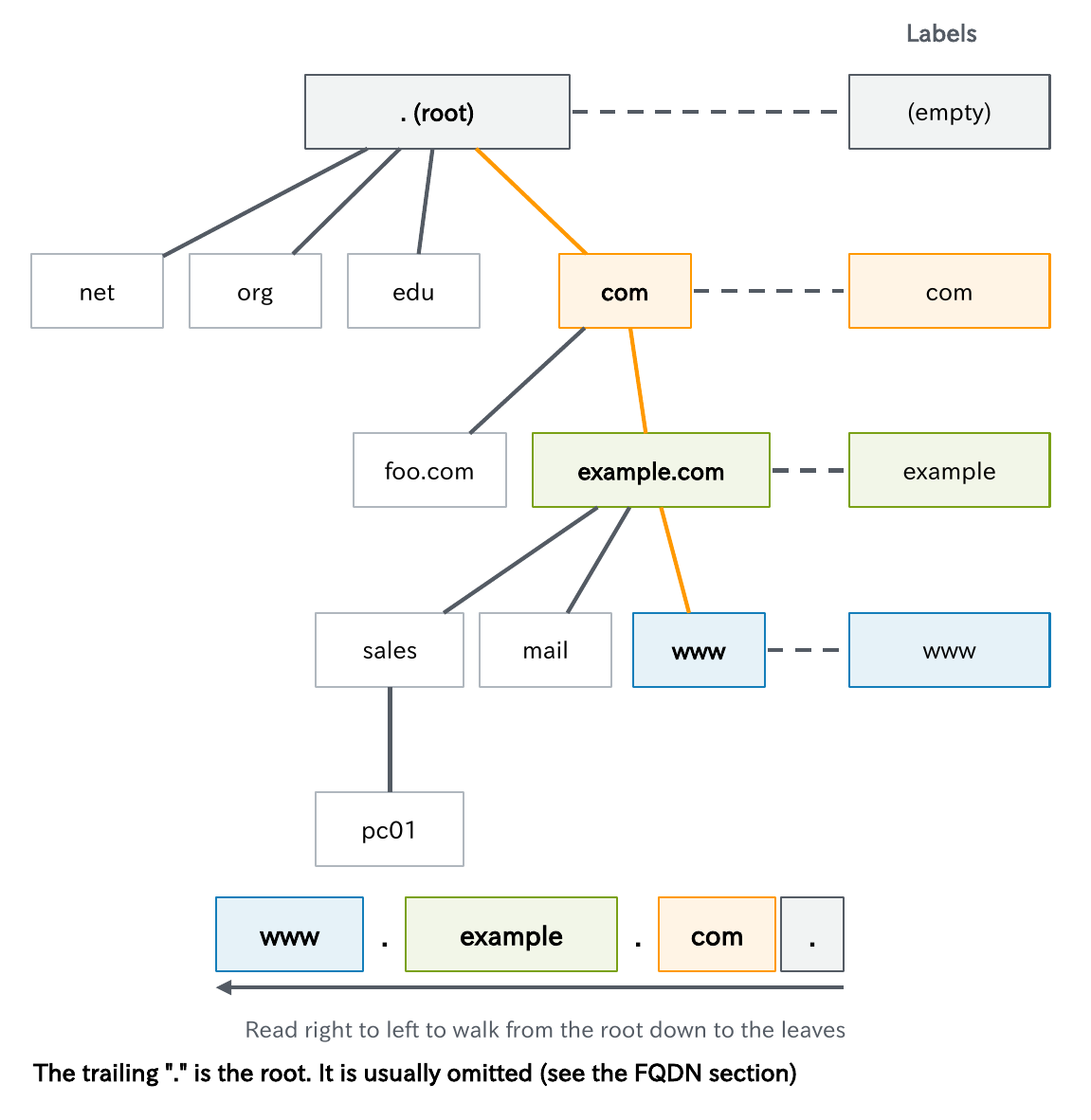
www.example.com is made of three labels separated by dots: www, example, and com. Reading from right to left takes you down the tree from the root to the leaves.
- Under the root are top-level domains (TLDs) such as
comandorg - Under those is
example.com, which an organization has registered - Below that come names such as
sales.example.comandwww.example.com, which the organization creates freely
As with a postal address in English, the left side is the finer unit and the right side is the larger one. Names only have to be unique under the same parent, so organizations all over the world can each have their own www.
Names have length limits.
- A label: up to 63 octets
- The whole name: up to 255 octets (up to 253 characters when written as text)
For host names, the usable characters are basically letters, digits, and hyphens. (Names in languages such as Japanese are covered later in this article.)
The root and TLDs
Here is a summary of the root at the top of the tree and the TLDs directly below it.
| Type | Examples | Managed by | Notes |
|---|---|---|---|
| Root | . (empty name) | IANA (operated by PTI, an ICANN affiliate) | The starting point of all name resolution |
| gTLD (generic) | .com, .net, .org | Each registry (Verisign for .com) | Under contract with ICANN. The registrant’s country does not matter |
| New gTLD | .app, .shop, .tokyo | Each registry | More than 1,200 were added in the 2012 round. A second round took place in 2026 |
| ccTLD (country/region) | .jp, .us, .uk | Each country’s registry (JPRS for .jp) | Two-letter country/region codes. Policy is set by each country |
| IDN TLD | .中国, .рф | Each registry | TLDs written in native-language characters |
| Infrastructure | .arpa | IANA | Reverse lookups (in-addr.arpa, ip6.arpa) and home.arpa |
As of September 2026, the root zone contains about 1,440 TLDs (IANA’s TLD list). Applications for the second round of new gTLDs were accepted from April 30 to August 12, 2026.
The key point is that TLDs you have never seen can actually exist. If you invent your own TLD inside your company, a TLD with the same name may be registered later and cause a collision (covered in detail in “Choosing an internal domain name” later in this article).
There are not just 13 root servers
Root servers are the servers that distribute the information in the root zone.
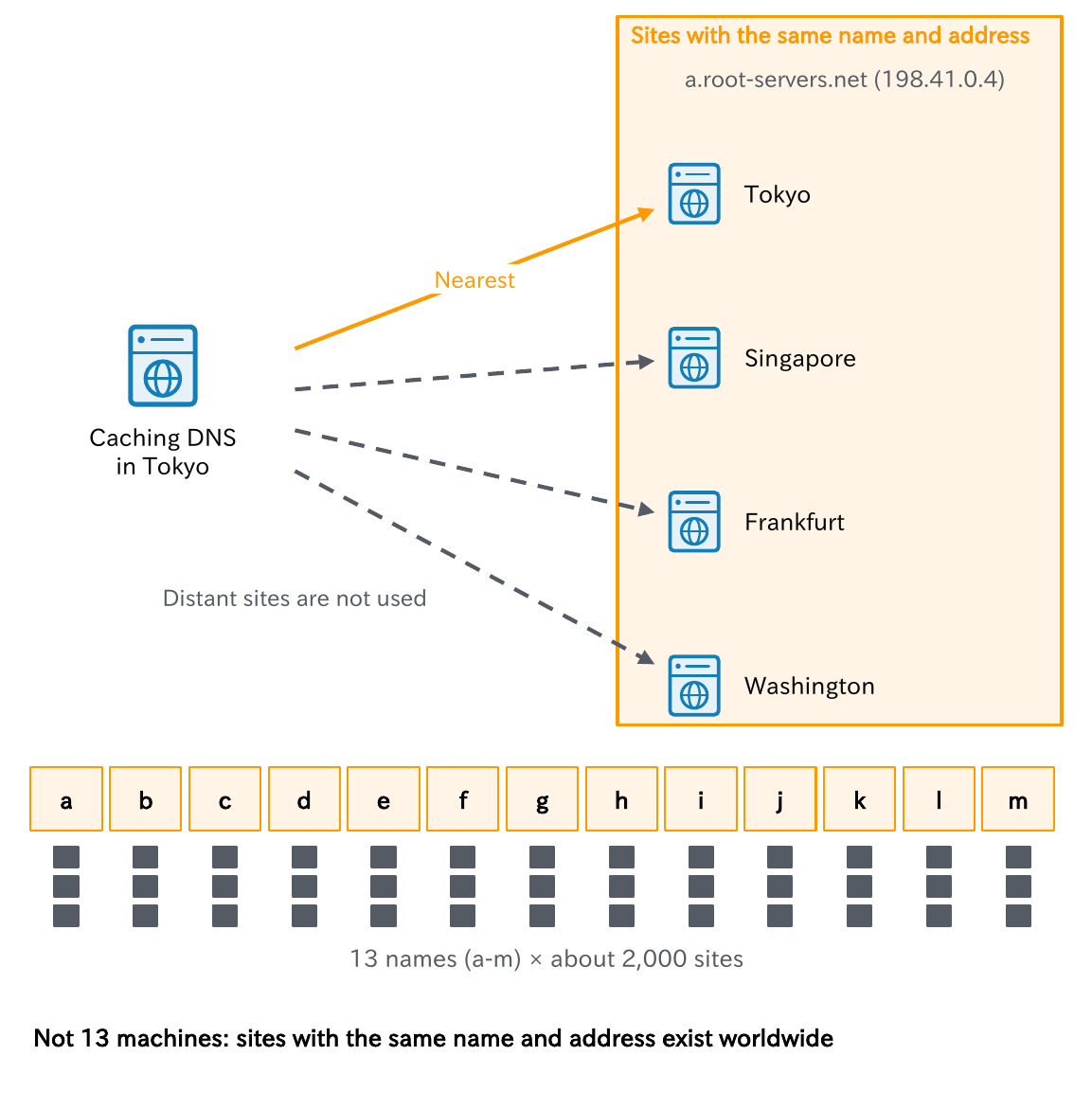
Root servers are represented by 13 names (13 identities), from a.root-servers.net to m.root-servers.net, and are operated by 12 organizations. The number 13 is a leftover from the early days of DNS, when it was chosen so that the list of root servers would fit in a single 512-byte UDP response.
However, there are not literally only 13 servers. Each identity uses a mechanism called anycast to advertise the same IP address from sites all over the world, and a query reaches the nearest site along the network path. As of September 2026, there are about 2,000 active sites, including some in Japan. If one site goes down because of an attack or a failure, the whole system keeps running.
Another important point: what a root server returns is, for the most part, a referral that says “ask so-and-so about that TLD.” The root servers do not know every name.
Key points
• There are 13 root server identities (a to m), operated by 12 organizations
• They are spread across about 2,000 sites with anycast, and the nearest site answers
• What the root returns is not an answer but a referral to the TLD’s servers
FQDNs and the trailing dot
An FQDN (fully qualified domain name) is a name written out with every label up to the root. Formally, you add the trailing dot that represents the root and write www.example.com..
Usually the trailing dot is left off, but in DNS there are situations where it changes the meaning.
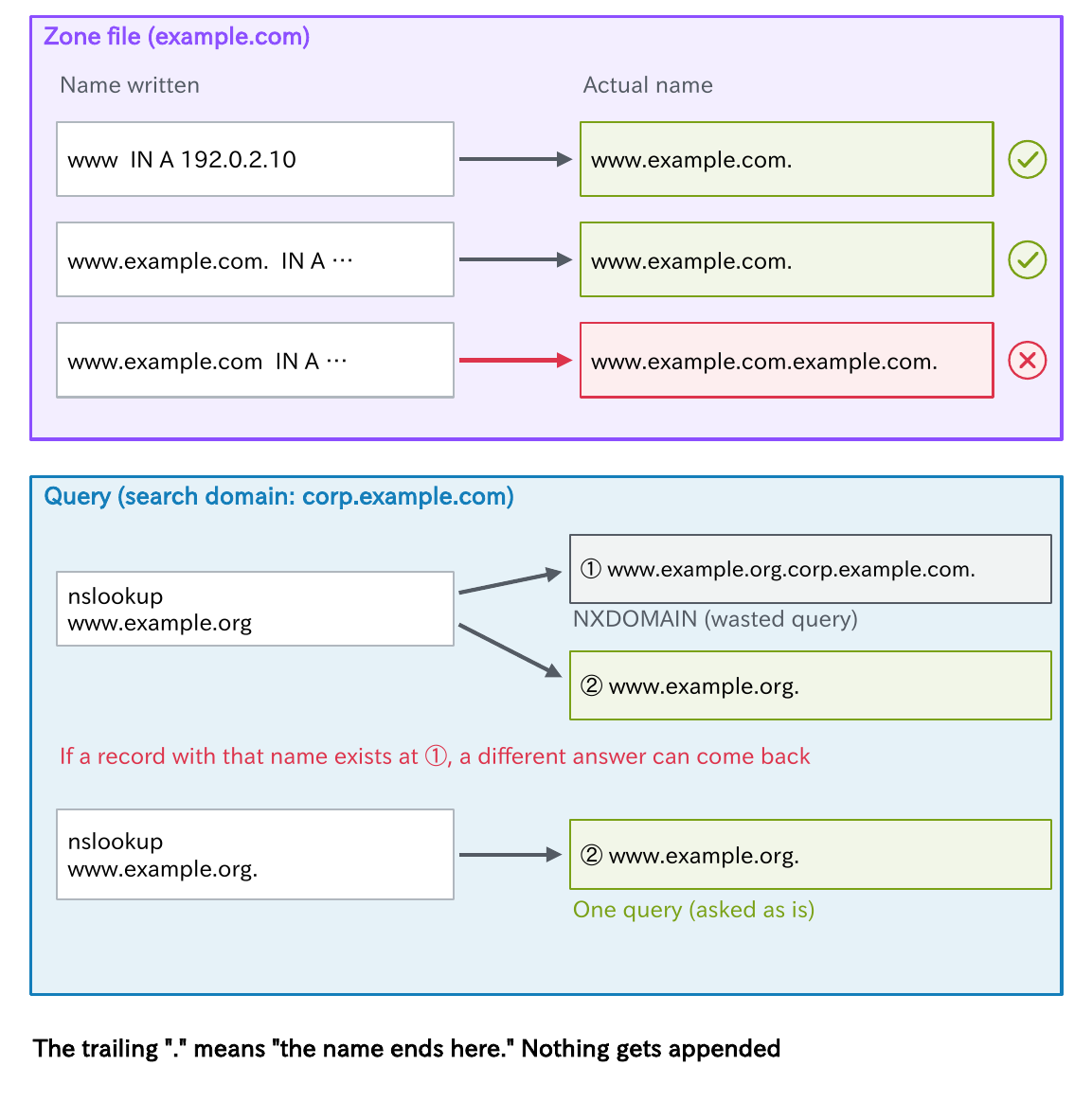
The first is the zone file. If you forget the dot and write www.example.com in a BIND zone file, the zone name is appended and you get www.example.com.example.com. (Part 5 covers this in detail).
The second is queries. An OS or tool may try appending a search domain (DNS suffix) to a name that does not end with a dot. For example, if the search domain is corp.example.com, looking up www.example.org produces a wasted query such as www.example.org.corp.example.com (Part 3). If a record with that name exists, a different answer can even come back.
Get into the habit of adding the trailing dot when investigating. The trailing “.” means “the name ends here,” and it lets nothing be appended.
The difference between a domain and a zone
Let’s answer the question at the start.
- Domain: part of the name tree. It refers to a name and every name below it
- Zone: the unit that one set of authoritative DNS servers manages together
The example.com domain includes both www.example.com and pc01.sales.example.com.
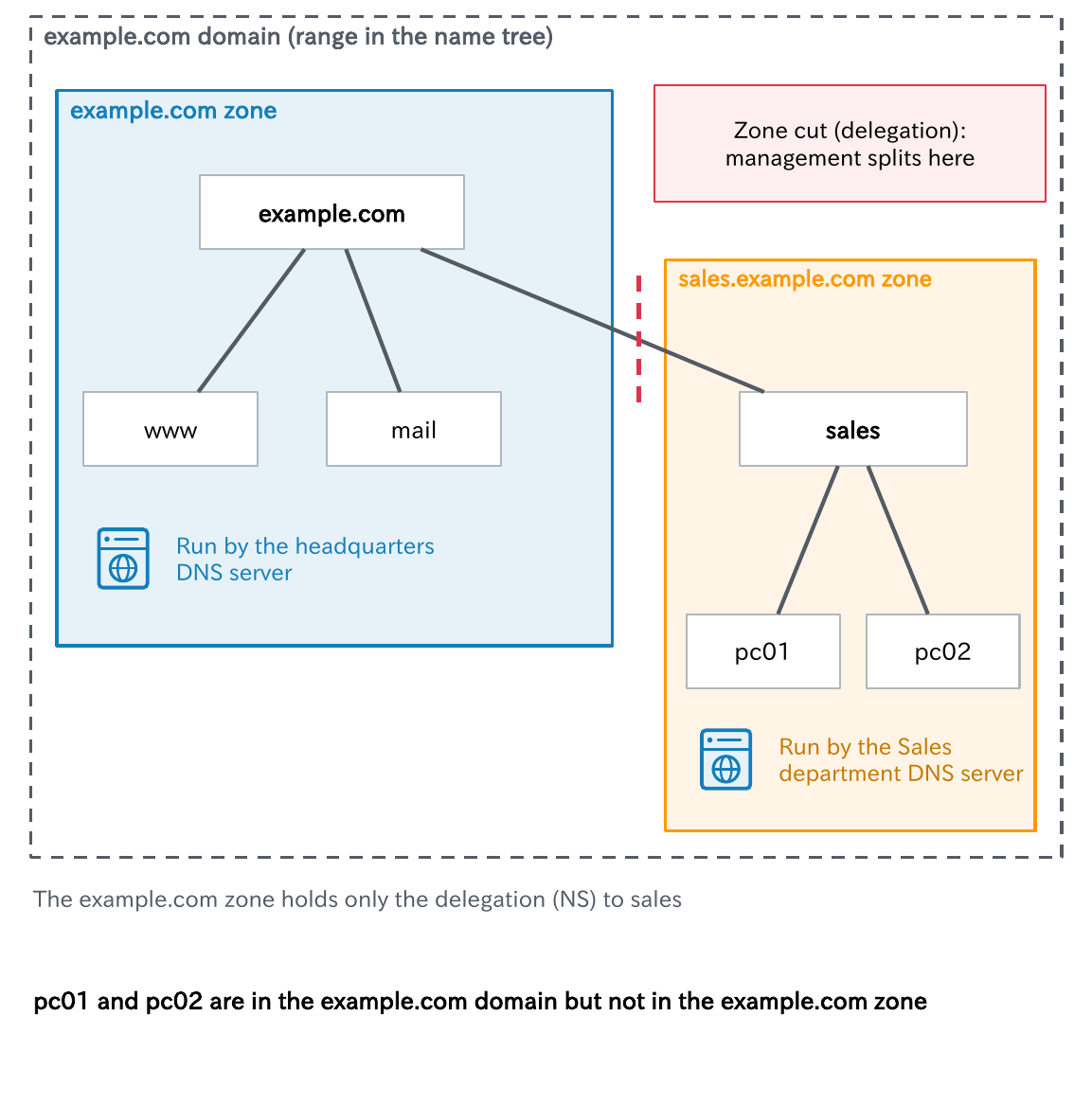
Suppose the administrator of example.com hands sales.example.com over to the Sales department’s DNS server (delegates it). The example.com zone then no longer contains any names below sales, and sales.example.com becomes a separate zone. This boundary is called a zone cut.
In terms of a company, the domain is “the whole organization, including every department,” and the zone is “the range of records one person is responsible for.” pc01 and pc02 are members of the example.com domain, but they are not in the example.com record book. What the example.com record book contains is only the delegation (NS) to sales.
If you never delegate, the two ranges are identical, so the difference is easy to overlook. But this distinction is essential when you design delegation or conditional forwarding.
Key points
• A domain is a range of the name tree; a zone is a unit of management (a record book)
• A delegated part leaves the parent zone and becomes a separate zone
• If you do not delegate, the domain and the zone cover the same range
Delegation (NS) and glue
Delegation means that a parent zone points to the authoritative DNS servers of a child zone, saying “for everything below this name, ask this server.” Concretely, you place NS records for the child zone’s name in the parent zone.
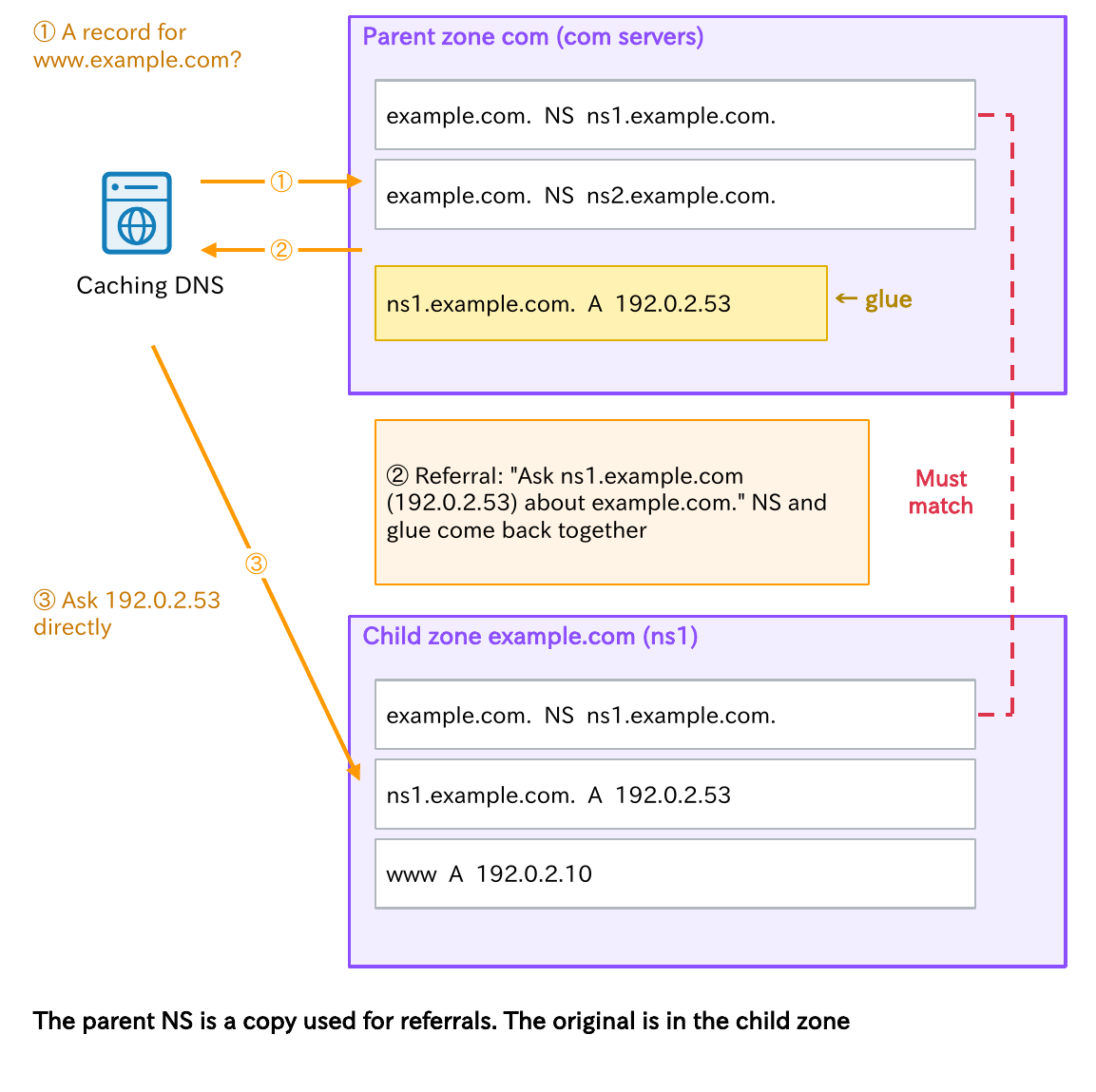
The com zone has entries such as ns1.example.com registered as the NS for example.com, and the com servers return this as a “referral.”
Why glue is needed
Here is a problem that arises when ns1.example.com is inside example.com. To learn the address of ns1.example.com, you have to ask example.com; to ask example.com, you need the address of ns1.example.com… a circular dependency.
To break the loop, the parent zone also holds the address (A and AAAA) of the NS name and returns it together with the referral. This is called glue. RFC 9471 (2023) requires that such glue always be included in the response, and that the TC bit be set if it does not fit (the TC bit is covered in Part 4).
Keep the parent and child NS records in agreement
As the diagram shows, NS records exist in both the parent (com) and the child (example.com). The parent’s NS is a copy for referrals; the original is in the child zone.
If the two disagree, only some queries fail, which is a very hard kind of failure to understand (Part 7). It tends to happen when you replace authoritative DNS servers and fix only one side.
Key points
• Delegation means placing the child zone’s NS records in the parent zone
• When the NS name is inside the child zone, the parent also holds its address (glue)
• A mismatch between parent and child NS records causes intermittent failures
Registries, registrars, and Whois/RDAP
So who registers your NS records in the parent zone (com, for example), and how? Let’s sort out the parties involved when you obtain a domain name.
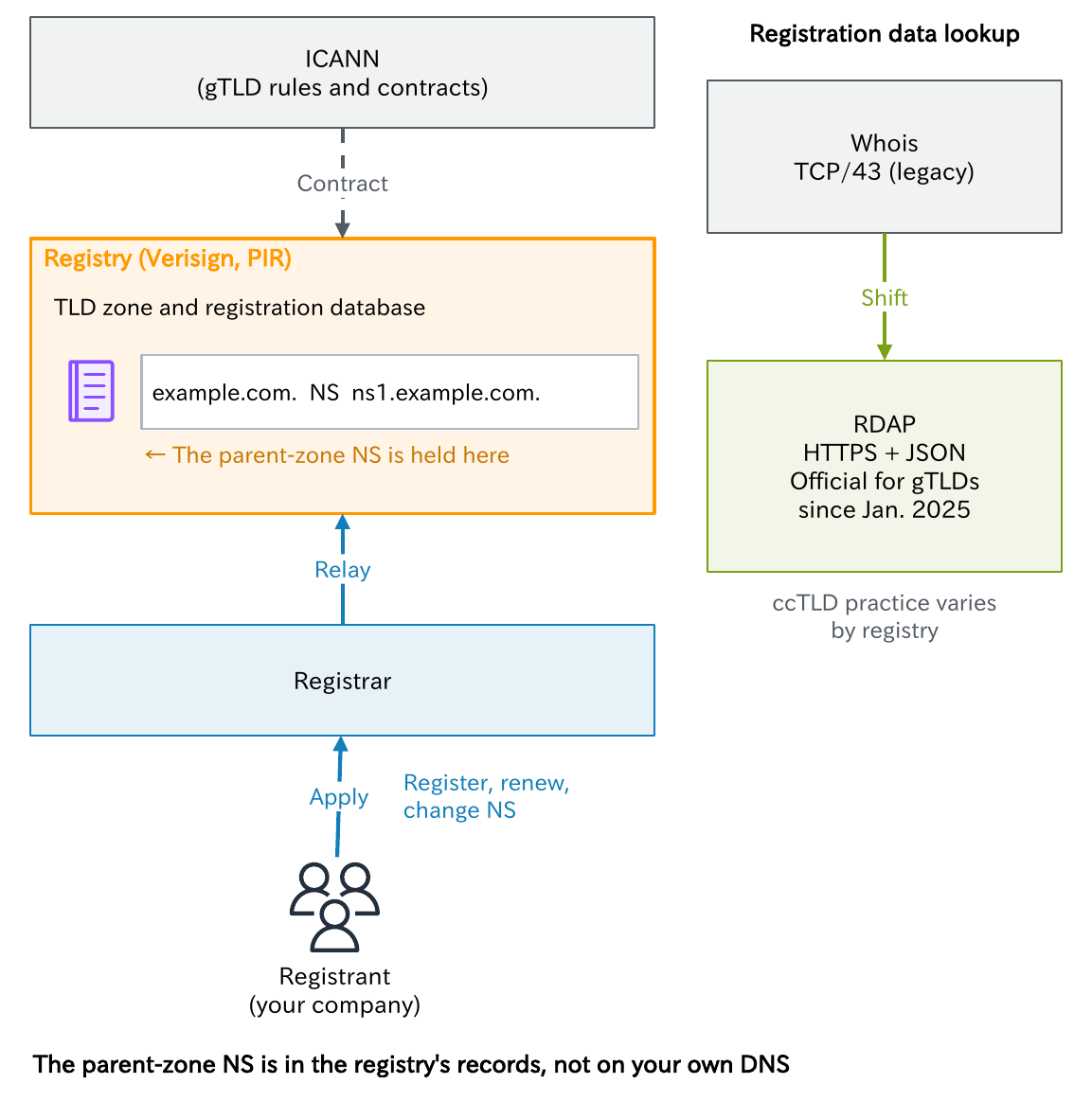
- Registry: the organization that manages a TLD’s zone and its registration database. Verisign runs .com and Public Interest Registry (PIR) runs .org (JPRS runs Japan’s .jp)
- Registrar: a business that accepts registration applications from users and relays them to the registry. In .jp, they are called “designated operators”
- Registrant: the party that contracts with the registrar (your company)
The registrant also registers its authoritative DNS server information (NS) in the parent zone through the registrar. In other words, the parent zone’s NS records are not on your own DNS; they are in the registry’s records.
That is why, when you change authoritative DNS servers, you must change the parent NS records on the registrar’s screen, not only in your own zone. If you forget, then even after you create the zone on the new DNS service, caching DNS servers all over the world keep asking the old servers.
From Whois to RDAP
Registration data such as the registrant and the expiration date was long published through Whois (TCP/43). For gTLDs, however, the obligation to provide Whois ended on January 28, 2025, and RDAP, which returns JSON over HTTPS, became the official method. How ccTLDs handle this is up to each registry.
Also, an expired domain can be acquired by a third party, so renewal management matters too (Part 9).
Key points
• Registries manage TLDs; registrars relay registrations
• When you change authoritative DNS, change the parent NS through the registrar too
• For gTLDs, registration data lookup moved from Whois to RDAP in January 2025
Choosing an internal domain name
The domain name you use for an internal Active Directory and similar systems is very hard to change later, so the initial choice matters.
What you should avoid is a made-up name that you have not registered.
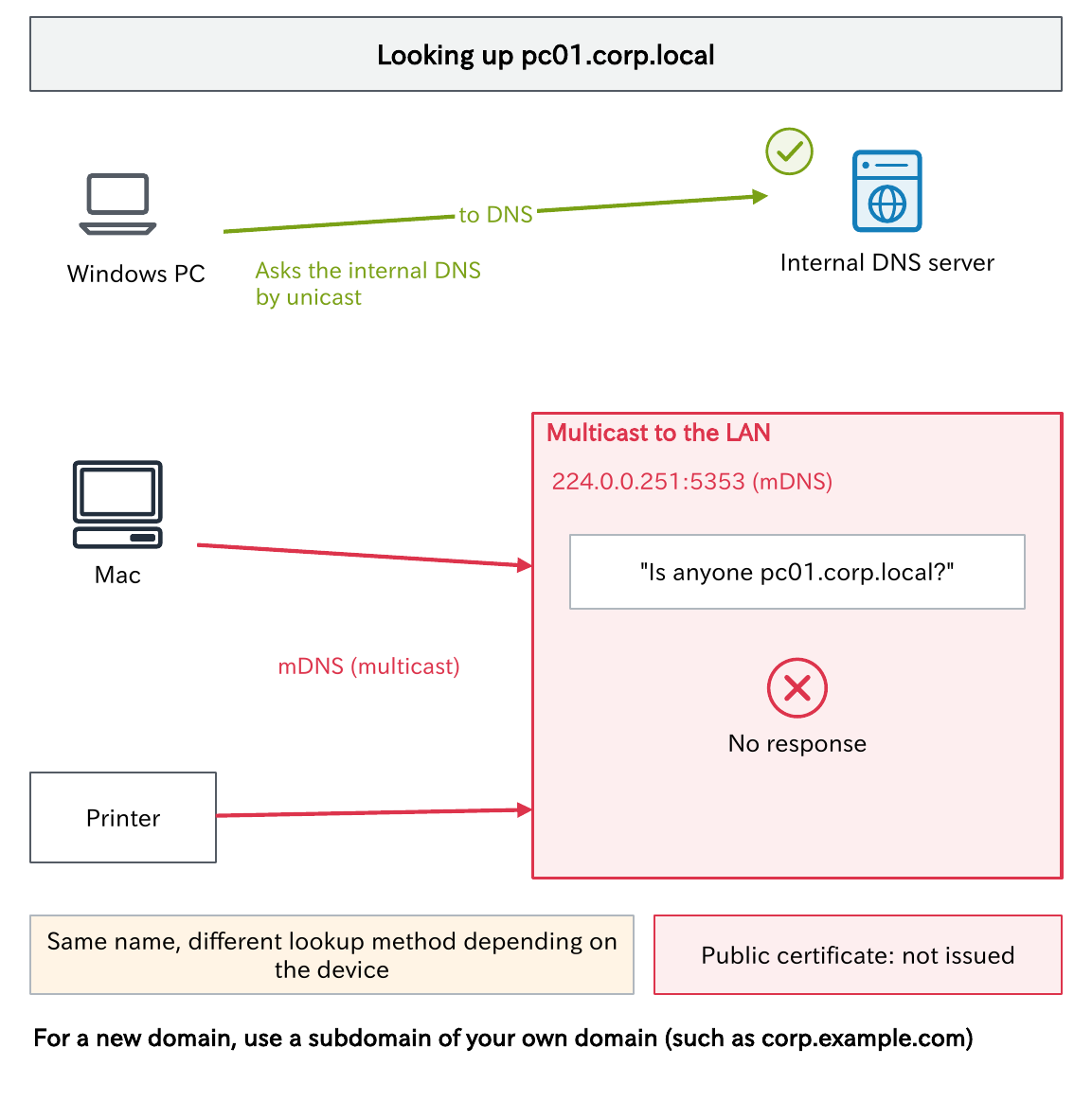
.local is reserved for mDNS
For example, .local is reserved for multicast DNS (mDNS) by RFC 6762. macOS, Linux (Avahi), printers, and similar devices do not ask a DNS server for names ending in .local; they try to resolve them by multicast on the LAN (224.0.0.251:5353).
As a result, as the diagram shows, the same name is looked up in different ways depending on the device, which causes failures that are hard to reproduce. It is not unusual for a .local name to be hiding behind a report like “it resolves from Windows but not from my Mac.”
Made-up names cause other problems too
- They can collide with a real TLD: there are cases where a name used internally was later registered as a real TLD and collided (for example,
.dev, delegated in 2014) - You cannot get a public certificate: public certificate authorities do not issue server certificates for unregistered internal names
- Microsoft does not recommend them either: Microsoft advises using a registered domain name, or a subdomain of one, for the AD domain name
For a new setup, use a subdomain of your own domain (such as corp.example.com).
Comparing the candidates
| Candidate | Example | Strengths | Drawbacks and cautions |
|---|---|---|---|
| A subdomain of your own domain (recommended) | corp.example.com | Globally unique. Public certificates are available. Recommended by Microsoft | You must keep holding the parent, example.com |
| .internal (reserved by ICANN in 2024) | corp.internal | Never delegated in the root, so it cannot collide with a public TLD | No public certificates (you need an internal CA). Can overlap if you merge with another company |
| home.arpa (RFC 8375) | printer.home.arpa | Reserved for home networks | Meant for home routers. Corporate use is not intended |
| .local | corp.local | (Common in existing environments) | Used for mDNS. Do not use it in new setups |
| An unregistered custom name | corp.lan, intra (a single label) | — | Risk of collision. A single-label AD domain name has many problems |
We recommend a subdomain of your own domain. Even for a name you do not expose externally, if you own the parent domain, there is no collision and you can get certificates.
Incidentally, .internal is already used in the cloud too, as in AWS EC2 internal names (such as ec2.internal); see Part 10 for name resolution inside a VPC. Split horizon, where the same name gets different answers inside and outside the company, is covered in Part 7, and how to choose an AD domain name is covered in the exercises in Part 12.
Names reserved for examples
For procedures, internal documents, and test environments, using names reserved for examples and testing keeps you from mixing them up with someone else’s real domain. The example.com used in this series is one of them.
| Name | Reserved by | Purpose |
|---|---|---|
| example.com, example.net, example.org | IANA (RFC 2606) | Examples |
| .example | RFC 2606 | Documentation and examples |
| .test | RFC 2606 | Testing DNS-related programs |
| .invalid | RFC 2606 | Creating names that are guaranteed to be invalid |
| example.jp, example.co.jp, example.ne.jp (and the same forms with example1 to example9), ドメイン名例.jp | JPRS | Examples |
These are collected in the list of special-use names (RFC 6761). Note, however, that names for examples and testing are not used as production internal domain names. For production, use a subdomain of your own domain, as in “Comparing the candidates” above.
Internationalized domain names (Punycode)
Finally, domain names in Japanese. The characters allowed in DNS host names were originally limited to letters, digits, and hyphens.
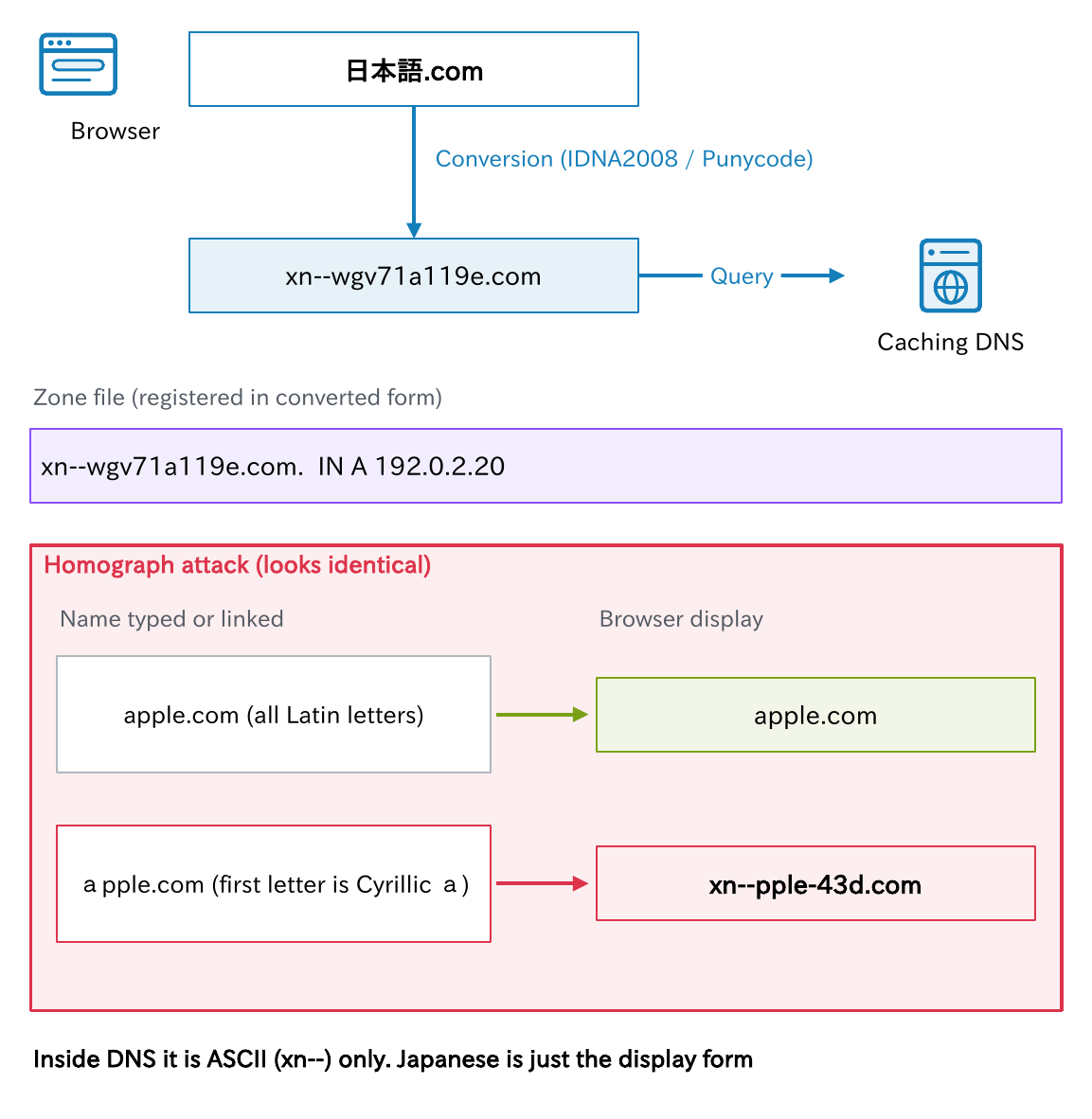
So an internationalized domain name (IDN) such as “日本語.com” is converted inside DNS to ASCII characters by a method called Punycode (RFC 3492), and handled with xn-- at the front. For example, 日本語.com becomes xn--wgv71a119e.com.
- The conversion is done by applications such as browsers (IDNA2008, RFC 5890 to 5893)
- Zones register the converted form
- As a result, in zone files and dig output the name appears as a string starting with
xn--
It helps to remember that inside DNS there is only ASCII (xn--), and Japanese is just the form shown on screen.
Beware of homograph attacks
Watch out for fake domain names (homograph attacks) that use look-alike characters. For example, the Latin “a” and the Cyrillic “а” are indistinguishable. аpple.com, with only the first letter in Cyrillic, is a different name, xn--pple-43d.com, inside DNS.
Major browsers protect against this, for example by displaying the Punycode form when they detect a dangerous mix of characters.
Think about it
- How can you check whether the NS records for your company’s domain match on the parent (TLD) side and on your own authoritative DNS side? What do you ask, and where?
- Which pattern does the domain name used inside your company follow (a subdomain of your own domain, .local, a custom name, or something else)? How do you issue internal server certificates?
- Do you know your company domain’s expiration date, who is responsible for renewal, and how it is paid for? What happens if that person is transferred?
Hint: This article’s “Delegation (NS) and glue,” “Registries, registrars, and Whois/RDAP,” and “Comparing the candidates” are good clues. You can compare the parent and child NS records by asking both with dig (with Resolve-DnsName -Type NS -Server on Windows) (Part 8).
Summary
- DNS names form a tree with the root at the top. Reading from right to left takes you from the root to the leaves
- There are 13 root server identities across about 2,000 sites. What the root returns is not an answer but a referral
- When investigating, add the trailing dot to avoid having a search domain appended
- A domain is a range of names; a zone is a unit of management. A delegated part becomes a separate zone
- Delegation means placing NS records in the parent. Add glue if needed, and keep the parent and child NS records in agreement
- For internal domain names, use a subdomain of your own domain instead of
.local
Next time, we look at how a caching DNS server actually searches for an answer and how long it remembers it (caching and TTL).
The DNS Fundamentals series (12 parts)
All 12 parts with a reading guide: DNS Fundamentals
- What Is DNS? How Name Resolution Works and Its Three Key Players
- The domain name hierarchy and delegation (this article)
- How name resolution works
- DNS messages and transport
- Resource records, part 1
- Resource records, part 2
- Running authoritative DNS servers
- Investigating with commands
- DNS security
- DNS in the cloud and on corporate networks
- DNS troubleshooting
- DNS design exercises
This series is the English edition of 【DNS入門】, originally written in Japanese.
コメント